An app store product page has two jobs: help the app rank in search and convince visitors to install. On the App Store, the app name, subtitle and keyword field affect search, while the icon, screenshots, preview video, ratings and promotional text drive conversion. On Google Play, the title and descriptions affect search, and the icon, feature graphic, screenshots, video and ratings drive conversion. Optimize ranking fields and the first visible creatives first.
Two jobs: ranking and conversion
Every element on a product page either helps the app appear in search, helps visitors decide to install, or both. Knowing which is which tells you where to spend effort.
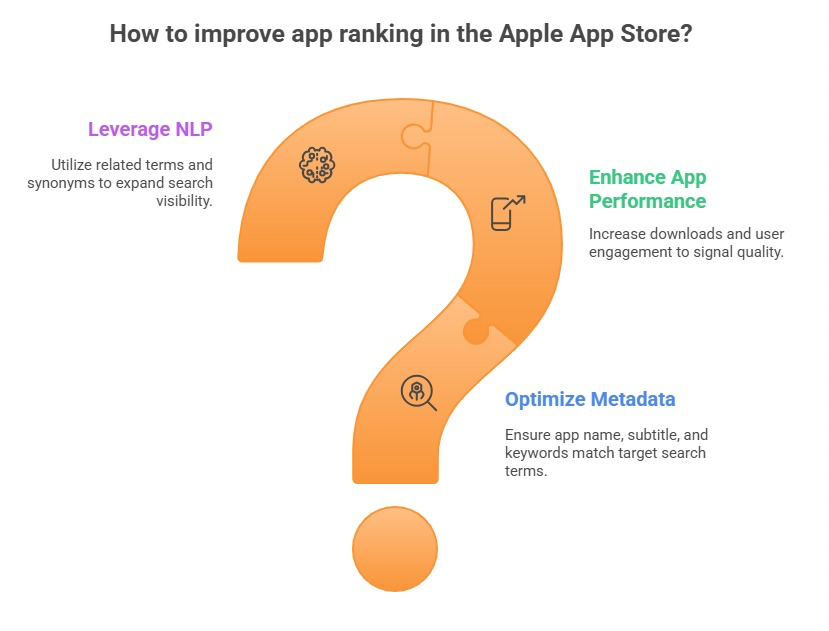
Search fields are limited and powerful; creatives decide whether impressions turn into installs. Our ASO guide explains how both feed rankings.
App name and title
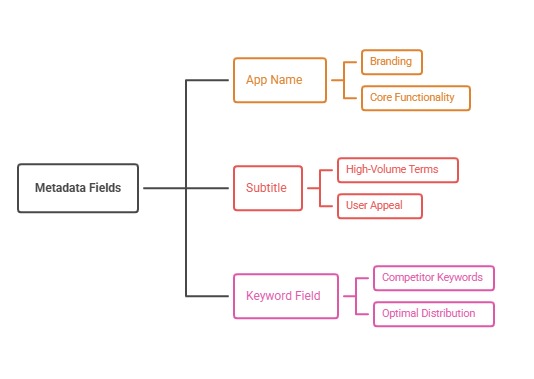
The App Store app name and the Google Play title are the strongest ranking fields and the first words users read. Both allow up to 30 characters. Combine the brand with the most important keyword where it reads naturally.
See app title naming strategy and the character limits cheat sheet.
Subtitle and short description
The App Store subtitle (30 characters) is indexed and appears under the name in search. The Google Play short description (80 characters) is indexed and appears near the top of the listing.
Use them to state the main benefit with a secondary keyword. See subtitle formulas and short description writing.
Keyword field (App Store only)
The App Store's hidden 100-character keyword field adds search terms users never see. Use commas without spaces, avoid repeating words already in the name or subtitle, and skip plurals and the app category name.
See our App Store keyword field guide.
Long description
On Google Play, the full description (up to 4,000 characters) is indexed for search, so it should use relevant keywords naturally. On the App Store, the description is not used for search ranking but still persuades readers.
See Google Play long description writing.
Icon
The icon appears everywhere: search results, charts, the home screen. It must be recognisable at small sizes and stand out against competitors. Icon tests can move conversion significantly.
See app icon A/B testing.
Screenshots
Screenshots are the main conversion element. The first two or three appear in search results on the App Store, so they must communicate the core benefit at a glance with clear captions.
See first three screenshots strategy and screenshot sizes.
Preview video and feature graphic
App previews on the App Store autoplay muted in some places; the first seconds must show the app in action. Google Play uses a promo video and a feature graphic that appears in some layouts.
See preview video first seconds and feature graphic.
Ratings and reviews
The star rating and rating count appear in search results and on the page, and recent reviews appear lower down. Both stores also show AI-generated review summaries for many apps.
See how app ratings are calculated and AI review summaries.
Promotional text and what's new
The App Store's promotional text (170 characters) can change without a new app version and is ideal for timely messages. Release notes show what changed and signal an active app.
See promotional text and what's new release notes.
In-app events and promotional content
App Store in-app events and Google Play promotional content appear on the product page and can show in search and browse. They give users a timely reason to install or return.
See in-app events and Google Play promotional content.
Privacy and safety sections
App Store privacy labels and Google Play's data safety section show what data the app collects. Clear, minimal data collection can reassure cautious users.
See privacy labels and data safety.
Custom pages
Custom product pages on the App Store and custom store listings on Google Play let you show different versions of the page to different audiences, such as an ad campaign or a country.
See custom product pages and custom store listings.
The order to optimize
Start with name, subtitle and keyword field or Google Play title and short description, then the icon and first screenshots, then ratings, then the remaining assets. Test creatives with native A/B tools.
Use our ASO checklist to work through each element.
How search results show your page
In App Store search results, users see the icon, name, subtitle, rating and the first screenshots or preview video. On Google Play, results show the icon, title, rating and sometimes the feature graphic or screenshots. Many users decide from this view without opening the full page.
Design the first screenshots and name for this compact view first, then for the full page.
Localized product pages
Each element can be localized for every language and country you target. Localized names, subtitles, keywords and screenshots improve both ranking and conversion in each market.
See app store localization strategy and cross-localization keywords.
Common product page mistakes
Common mistakes include keyword-stuffed names, screenshots that show settings screens, outdated promotional text, ignoring the rating, and the same creatives in every country.
Another is changing many elements at once, which makes results impossible to read.
Key takeaways
Ranking fields decide whether the page appears; creatives and ratings decide whether visitors install. Optimize the name and indexed text first, then the icon and first screenshots, then ratings, and test everything with the stores' own tools.
How to do it, step by step
- Audit every elementList each field and creative and its current state.
- Fix ranking fields firstName, subtitle, keyword field or title and descriptions.
- Strengthen icon and first screenshotsThey decide most installs.
- Improve ratingsPrompt satisfied users and reply to reviews.
- Test and refreshUse native A/B tests and timely promotional assets.
Before and after examples
Illustrative examples written for a generic app in this category, not client results. Swap in your own product, audience, and data.
The best app ever
Budget planner for couples
Why it works: A benefit with a keyword ranks and converts.
Login screen.
Main benefit with a short caption.
Why it works: Visitors decide in seconds.
Never updated.
Seasonal message updated monthly.
Why it works: Fresh messages support conversion.
Action plan
- Separate ranking and conversion elements
- Optimize indexed fields
- Lead with strong creatives
- Protect ratings
- Use events and promo text
- Test continuously
Metrics to monitor
- Impressions
- Product page views
- Conversion rate
- Keyword rankings
- Average rating
Record the baseline, release date, audience, markets, and external changes before interpreting movement. Rankings and conversion are useful signals, but a decision is stronger when activation, retention, and business value confirm that the page attracted the right users.
Frequently asked questions
What elements are on an App Store product page?
App name, subtitle, icon, screenshots, preview videos, description, promotional text, ratings and reviews, privacy details, in-app events and more.
Which elements affect App Store search ranking?
Mainly the app name, subtitle and keyword field, plus performance signals such as downloads and ratings.
Is the App Store description indexed?
It is not used for search ranking, but it still persuades users.
Which Google Play elements affect ranking?
The title, short description and full description, plus performance and quality signals.
What is the most important conversion element?
Usually the icon and first screenshots, along with the rating.
Can I change promotional text without an update?
Yes, App Store promotional text can be changed without a new app version.
Keep reading
More in Conversion Optimization
Browse all 10 Conversion Optimization guides