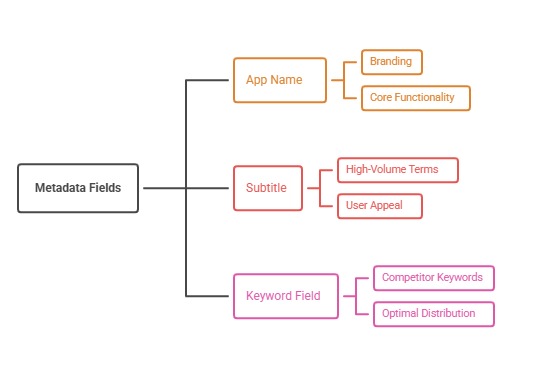
A strong App Store subtitle uses its roughly 30 characters to state the outcome or the main use case in plain words, adds one or two relevant search terms the name does not already cover, and avoids repeating words. Six patterns cover most apps: outcome, audience, object plus action, differentiator, category plus qualifier, and use-case pair.
Start from what the name does not say
The subtitle sits beside the name in search results, so the pair reads as one message. If the name is a brand, the subtitle must carry the meaning. If the name already holds a core keyword, the subtitle should add a different concept, not repeat it.
Write down the three concepts a visitor must understand in two seconds, then decide which the name covers. The rest become subtitle candidates.
Six patterns that work
Outcome: states the result, such as Plan meals and save time. Audience: names who it is for, such as Budgeting for couples. Object plus action: Scan, sign, and send documents. Differentiator: Offline notes that sync fast. Category plus qualifier: Simple habit tracker. Use-case pair: Workouts and meal plans.
Pick the pattern that fits your positioning, then replace generic adjectives with the specific nouns users search for.
Spend the character budget carefully
With about 30 characters, every word competes. Remove filler such as best, the, and your unless they carry meaning. Check the text on small devices to confirm it does not truncate awkwardly.
Avoid stuffing unrelated keywords. Apple evaluates relevance, and incoherent subtitles reduce persuasion even if they add terms.
Test and localize
Change the subtitle on a planned release, annotate it, and watch visibility for the target terms and product page conversion together. Do not change the name, keywords, and screenshots at once.
Localize meaning, not just words, because a direct translation may lose the search term users actually type.
Common mistakes with App Store subtitle
The first mistake is repeating the app name in the subtitle, which wastes space. The second is stacking keywords with commas, producing text that reads like spam and lowers tap-through. The third is promising something the screenshots never show, which creates a mismatch the visitor notices in seconds.
Teams also rewrite the subtitle and the first screenshot in the same release, making it impossible to say which change moved results.
App Store subtitle: a worked example
Take a budgeting app named Penny. A weak subtitle is Best budget app for money. A stronger subtitle, using the audience pattern, is Budgeting for couples and families, which adds new concepts and a clear audience. If research shows shared budgets are searched often, the pair reads naturally in results.
The team ships it on a planned release, annotates the date, and watches visibility for shared budget phrases and page conversion over the following weeks.
Character budget in practice
The subtitle limit is about 30 characters, including spaces. Scan, sign, and send PDFs is 25 characters, so it fits with room to spare. Plan meals and save time is 24. Budgeting for couples and families is 34, which is too long, so it would be shortened to Budgeting for couples.
Count characters in your editor before pasting into App Store Connect, and confirm the current limit in the console.
How to do it, step by step
- List what the name does not sayWrite the concepts a visitor must understand in two seconds and mark those the name already covers.
- Choose a patternPick outcome, audience, object plus action, differentiator, category plus qualifier, or use-case pair.
- Draft five optionsWrite five candidates of about 30 characters each.
- Check search and truncationPreview each with the name in the results list on a small phone.
- Ship and annotateChange only the subtitle in a release, log the date, and watch visibility and conversion.
Before and after examples
Illustrative examples written for a generic app in this category, not client results. Swap in your own product, audience, and data.
Budget app
Budgeting for couples
Why it works: It names who it is for.
Document app
Scan, sign, and send PDFs
Why it works: Verbs describe the workflow.
Notes app
Offline notes that sync fast
Why it works: It states what is different.
Action plan
- List concepts the name does not cover
- Choose one of the six patterns
- Remove filler words
- Avoid repeating name terms
- Check truncation on small devices
- Change one major element per release
Metrics to monitor
- Visibility for added terms
- Product page conversion
- Impressions to page views
- Subtitle change annotations
Record the baseline, release date, audience, markets, and external changes before interpreting movement. Rankings and conversion are useful signals, but a decision is stronger when activation, retention, and business value confirm that the page attracted the right users.
Frequently asked questions
How long is the subtitle limit?
It is about 30 characters, but confirm current limits in App Store Connect.
Should the subtitle repeat name keywords?
Generally no. Use it to add different relevant concepts.
Can I change it often?
You can with each version, but change deliberately so results are interpretable.
Keep reading
More in Metadata Craft
Browse all 10 Metadata Craft guides