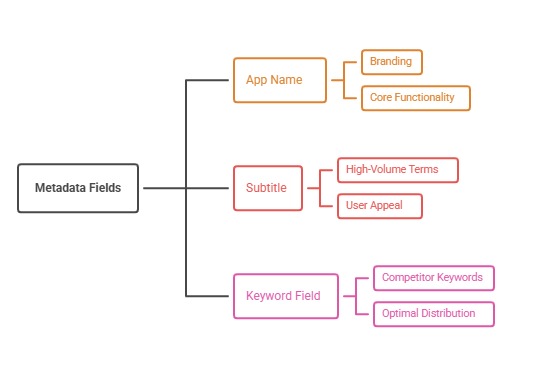
The App Store keyword field is a private metadata field used to help Apple understand relevant searches for an app. Use it to extend the concepts already communicated by the product, name, and subtitle. Prioritize specific, relevant words; use commas as separators; verify localization; and avoid claims, trademarks, or terms that do not match the actual experience.
Give scarce space a clear job
Start by locking positioning. The name should communicate brand and core value; the subtitle should clarify the main outcome or differentiator. The keyword field then expands coverage into supporting features, audiences, and use occasions. Without this hierarchy, teams fill the field with disconnected popular words.
Create a term-allocation sheet with columns for theme, intent, evidence, field, locale, and expected message. This reveals accidental repetition and makes it easier to defend why a word deserves space.
Build combinations around real intent
Favor component words that can support several relevant phrases, but never sacrifice clarity for theoretical combinations. Each resulting phrase should describe something the app actually does. Remove filler, vague adjectives, and terms whose visitor expectations the screenshots cannot satisfy.
Check the store's current metadata rules before submission. Avoid promotional statements, unverifiable superlatives, category manipulation, and unauthorized brand references. Relevance and compliance are more durable than a short-lived loophole.
Localize the field, not just the interface
Apple allows localized metadata, and users can search with localized keywords where that language is supported. Research native vocabulary and regional intent rather than translating an English list word for word. Product usage, financial terms, and cultural occasions can differ materially by market.
Keep a locale matrix showing the primary language, translated product value, approved terminology, keyword themes, and creative match. Have a native reviewer check meaning, tone, ambiguity, and truncation before release.
Test as a portfolio
Benchmark rankings and store outcomes before the release, annotate the exact change, and allow a consistent observation window. Look for movement across the theme portfolio instead of celebrating one volatile rank. Conversion and downstream product quality remain essential guardrails.
When a theme fails, diagnose the cause: weak demand, high competition, low textual relevance, poor creative match, or a product gap. The correct response may be new screenshots or a better feature—not another synonym.
Action plan
- Assign one purpose to name, subtitle, and keyword field
- Keep a locale-specific term allocation sheet
- Choose words that form only relevant phrases
- Validate every term against the live product
- Record exact metadata changes
- Evaluate rankings with conversion and retention
Metrics to monitor
- Priority phrase coverage
- Rank distribution, not a single peak
- Search-source conversion
- Organic cohort quality
Record the baseline, release date, audience, markets, and external changes before interpreting movement. Rankings and conversion are useful signals, but a decision is stronger when activation, retention, and business value confirm that the page attracted the right users.
Frequently asked questions
Can users see the iOS keyword field?
No. It is entered in App Store Connect and is not displayed on the public product page, but every term should still be accurate, policy-compliant, and relevant.
Should the same keyword appear in every field?
Avoid reflexive repetition that wastes limited space. Give each field a deliberate role, while keeping the visible name and subtitle natural and persuasive.
Does the app description replace the keyword field?
No. They serve different purposes. The description helps people evaluate the product; the dedicated keyword field supplies additional search metadata. Both should support the same positioning.
Keep reading
Go deeper on this topic
More in Keyword Strategy
Browse all 14 Keyword Strategy guides
Work with ASOWin
Primary sources
Platform capabilities and limits can change. Verify current requirements in these official resources: