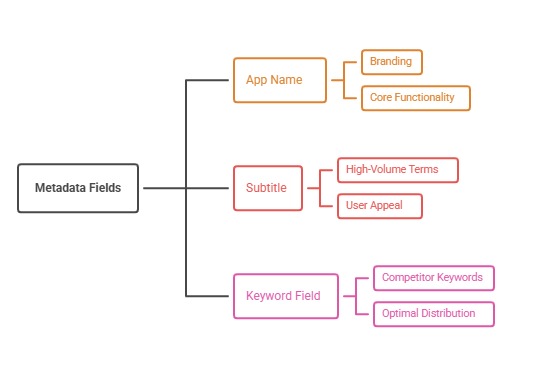
Mac App Store optimization uses the same metadata fields as iOS (a 30-character name and subtitle, a 100-byte keyword field, and a description) but serves a different user. Mac buyers often research on the web first, compare professional tools, and care about workflows, integrations, and trials. Win with workflow-specific keywords, 16:10 screenshots that show real windows, clear pricing, and a website that ranks for the same problems.
How Mac discovery differs from iPhone
Mac users are more likely to arrive with a specific job in mind, such as resizing images in bulk, managing windows, or editing PDFs. Many search the web before the store, read comparison articles, and download from developer websites as well as the Mac App Store. Search volume inside the Mac App Store is smaller than on iPhone, but intent is often higher and willingness to pay is strong for tools that save time.
That means Mac ASO works best alongside web SEO. Your website and the store listing should target the same problems with consistent language. Our guide to web-to-app SEO covers how websites and listings reinforce each other, and the ASO vs SEO comparison explains which skills transfer.
Metadata: the same fields, different vocabulary
The Mac App Store indexes the app name, subtitle, and keyword field like the iOS App Store does, with the same character and byte limits. The difference is vocabulary. Mac users search for tasks and workflows, such as menu bar, clipboard manager, or batch rename, and for file formats and integrations. Build keyword research from these terms rather than copying an iPhone listing.
If you sell a universal purchase across iPhone, iPad, and Mac, each platform still has its own metadata and screenshots, so optimize the Mac listing on its own terms. Our guides to the App Store keyword field and long-tail app store keywords apply directly, with workflow terms as the long tail.
Screenshots that show the real desktop experience
Mac screenshots use a 16:10 aspect ratio, such as 2880 x 1800 or 1440 x 900, and you can upload up to ten. Show real windows in realistic contexts: a full workspace, a menu bar popover, a settings panel with meaningful options, or before-and-after results. Captions should name the workflow benefit, such as rename a thousand files in seconds.
Avoid tiny interface text that becomes unreadable in the store's thumbnail view. Crop or zoom to the part of the window that matters, and include one screenshot that shows the app alongside tools users already rely on. See our App Store screenshot sizes guide for current dimensions.
Pricing, trials, and professional buyers
Mac tools are often bought by professionals who want to evaluate before paying. Free downloads with an in-app trial or a free tier convert better than a paid upfront price for most utilities, because the store's paid-app flow does not offer a trial. Make trial length and pricing clear in screenshots and the description so buyers know what to expect.
Team and business buyers may need invoices, volume licensing, or managed deployment, which you can handle on your website. Clear subscription messaging reduces refunds and negative reviews; see subscription messaging in store listings and freemium vs paid app pricing.
iPhone and iPad apps on Apple silicon Macs
Many iPhone and iPad apps can be available on Macs with Apple silicon by default unless the developer opts out. If your iOS app appears on Mac, check how it behaves with a keyboard, mouse, and resizable windows, because a poor experience generates low ratings visible to Mac users. Opt out if the app does not make sense on a Mac.
If the Mac is a strategic platform, consider a native or Catalyst version with Mac-appropriate design, menus, and shortcuts. A dedicated Mac experience earns better reviews, editorial attention, and word of mouth than a phone layout stretched across a large screen.
Common Mac App Store mistakes
Copying the iPhone listing is the most frequent error. Phone-style screenshots, consumer vocabulary, and a subtitle that ignores workflows all signal that the Mac version is an afterthought. Another mistake is charging upfront without a trial, which pushes careful professional buyers to competitors that let them evaluate first.
Developers also forget the listing after launch. Mac users leave fewer reviews than iPhone users, so each review carries more weight, and an unanswered complaint can sit at the top of the page for months. Reply to reviews, ask for ratings at moments of clear value, and refresh screenshots when the interface changes with a new macOS release.
A worked example: a window-management utility
A window-management app lists itself with the subtitle Productivity tool and screenshots of its settings window. Searches for its core tasks bring few impressions, and conversion is low. The team rewrites the subtitle as Snap windows with shortcuts, fills the keyword field with workflow terms such as tile, resize, split, monitor, and layout, and replaces settings screenshots with workspace shots showing tiled windows.
It switches from a paid upfront price to a free download with a 14-day trial and states the trial in the first screenshot. It also publishes web guides for each workflow that link to the store. Over the next quarter, store impressions and trial starts rise, and refund requests fall because buyers know what they are getting.
How to do it, step by step
- Research workflow vocabularyList tasks, file formats, and integrations your users search for, using web search data, support tickets, and competitor listings.
- Write Mac-specific metadataUse the 30-character name and subtitle and 100-byte keyword field for workflow terms rather than reusing iPhone metadata.
- Capture real desktop screenshotsCreate 16:10 screenshots that show working windows and outcomes, with captions naming the workflow benefit.
- Offer a clear trialUse a free download with an in-app trial or free tier, and state the terms in the listing.
- Align your websitePublish web pages targeting the same workflows and link them to the Mac App Store listing.
Before and after examples
Illustrative examples written for a generic app in this category, not client results. Swap in your own product, audience, and data.
Productivity tool
Snap windows with shortcuts
Why it works: A specific workflow matches how Mac users search.
Settings window with dozens of toggles.
A tiled workspace with the caption Organize any screen in one shortcut.
Why it works: Outcomes sell better than configuration.
$29.99 upfront with no trial.
Free download, 14-day full trial, then $29.99 one-time unlock.
Why it works: Professionals want to evaluate before buying, and the store has no built-in trial for paid apps.
Action plan
- Research workflow and integration keywords
- Optimize Mac metadata separately from iOS
- Show real windows in 16:10 screenshots
- Offer an in-app trial or free tier
- Check how iOS apps behave on Apple silicon Macs
- Pair the listing with web pages for each workflow
Metrics to monitor
- Mac App Store impressions and product page views
- Product page conversion rate
- Trial start to purchase rate
- Refund rate
- Web referral installs
Record the baseline, release date, audience, markets, and external changes before interpreting movement. Rankings and conversion are useful signals, but a decision is stronger when activation, retention, and business value confirm that the page attracted the right users.
Frequently asked questions
Is the Mac App Store worth optimizing?
Yes, for apps with clear Mac use cases. Search volume is smaller than on iPhone, but intent and willingness to pay are often higher.
What screenshot size does the Mac App Store use?
A 16:10 ratio, at 1280 x 800, 1440 x 900, 2560 x 1600, or 2880 x 1800 pixels.
Does the Mac App Store use the same keyword field as iOS?
Yes. The Mac App Store indexes the name, subtitle, and 100-byte keyword field, with platform-specific metadata for each.
Should a Mac app be sold outside the App Store too?
Many developers sell both in the store and directly from their websites with notarized builds. The store adds discovery and trust; direct sales add licensing flexibility.
Keep reading
Go deeper on this topic
More in Other App Stores
Browse all 8 Other App Stores guides
Work with ASOWin
Primary sources
Platform capabilities and limits can change. Verify current requirements in these official resources: