Apple supports several localizations in many App Store storefronts, and metadata from more than one localization can be considered for search in a storefront. ASO teams use this to extend keyword coverage beyond the primary language's 100-byte keyword field, for example by adding relevant terms in a secondary localization's keyword field. Use it responsibly: metadata in each localization is what speakers of that language see, so it must be genuine and relevant, and results should be measured carefully.
How storefronts and localizations work
App Store Connect lets you provide metadata in many languages, and each storefront supports certain localizations. A user sees the localization that matches their device language if available, falling back to the primary language otherwise. Apple documents which localizations are available in each storefront.
In several storefronts, including large ones such as the United States, more than one localization is available, reflecting multilingual populations. ASO practitioners have observed that keywords from additional localizations can contribute to search visibility in those storefronts.
Why teams use cross-localization
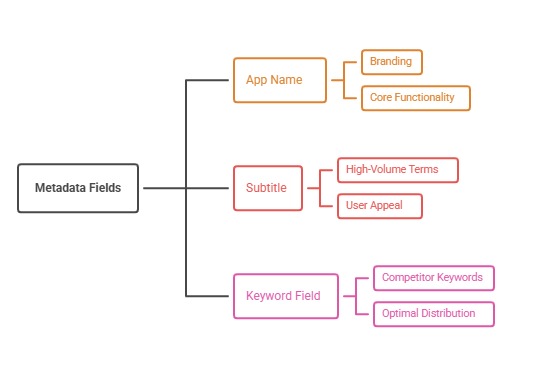
The App Store keyword field is limited to 100 bytes per localization, and the name and subtitle are limited to 30 characters each. For apps with many relevant terms, that space runs out quickly. Additional localizations offer more fields that may be indexed in a storefront, extending coverage without stuffing the primary listing.
This tactic is most useful for apps with broad keyword sets, such as utilities, games, and multi-feature apps. Our App Store keyword field guide explains maximizing each field first.
Use it responsibly
Metadata in each localization is visible to users with that device language. If you put English keywords in a secondary localization's name or subtitle, users of that language see them, which can look wrong. Keep visible fields, such as the name, subtitle, and description, genuine and appropriate for the language.
The keyword field is not visible to users, which is why practitioners focus cross-localization there. Even so, keywords must be relevant to your app, and Apple's guidelines prohibit irrelevant or misleading metadata. Our white hat vs black hat ASO guide explains the boundaries.
Genuine localization is better
The best use of additional localizations is genuine localization for multilingual audiences. In the US, for example, Spanish speakers are a large audience, and a real Spanish listing serves them while adding coverage. Our ASO for Spanish speakers in the US guide explains this opportunity.
Genuine localization improves conversion for those users, not just rankings. It is more durable than using localizations solely as keyword containers.
Plan keyword allocation across localizations
Map keywords across the primary and additional localizations so they complement rather than duplicate each other. Avoid repeating the same terms across fields, which wastes space. Place the most important terms in the primary name and subtitle, which carry more weight.
Our keyword cannibalization guide explains avoiding self-competition within metadata.
Check current documentation
Apple's storefront and localization support can change, and practitioners' observations about indexing are not official guarantees. Check Apple's current documentation on localizations per storefront, and test changes rather than assuming results.
Monitor App Store Connect for any guidance or review feedback related to metadata.
Measure the impact
Track rankings for the added keywords in the target storefront, along with impressions and installs from search. Allow time for indexing after a new version. Compare performance before and after, and watch conversion to make sure visible metadata changes did not hurt it.
Our keyword ranking tracking guide explains reliable measurement.
Google Play is different
Google Play does not have a hidden keyword field. It indexes visible text in the title, short description, and full description per language. Cross-localization tactics from iOS do not translate directly; on Google Play, focus on genuine localized listings.
Our Google Play keyword optimization guide covers Play's approach.
Which apps benefit most
Apps with many distinct, relevant keyword themes benefit most, such as utilities that serve several tasks, games with multiple mechanics and themes, and productivity tools with broad feature sets. Apps with a narrow focus may already cover their core terms in the primary fields, leaving little to gain.
Before investing, check whether your primary fields are truly full of relevant terms and whether rankings for secondary terms would bring meaningful impressions. Our keyword popularity and difficulty scores guide helps decide whether additional terms are worth the effort.
Release workflow and governance
Additional localizations add maintenance: every metadata update must consider several languages, and screenshots and descriptions must stay accurate. Document which localizations exist, who owns each, and what each keyword field contains, so later updates do not accidentally break coverage.
Include localization checks in your release checklist, and review all localizations when product features change. Our ASO audit checklist can be extended with a section for localization coverage.
Common cross-localization mistakes
Putting English text in a secondary localization's visible fields is the most common mistake, confusing users. Another is using irrelevant keywords, risking rejection. Duplicating terms across localizations wastes space.
Teams also assume results without testing, or neglect genuine localization opportunities that would serve real users.
A worked example: a utility app in the US
A PDF scanner app's English (US) keyword field is full. The team creates a genuine Spanish (Mexico) localization, which is available in the US storefront, with a Spanish name, subtitle, and description for Spanish-speaking users, and uses its keyword field for additional relevant terms.
After the next version, rankings improve for several additional terms, and conversion among Spanish-speaking users rises because they now see a native listing.
How to do it, step by step
- Check storefront localizationsReview Apple's documentation for localizations available in your target storefront.
- Maximize primary metadata firstUse the primary name, subtitle, and keyword field efficiently.
- Add genuine localizationsCreate real listings for multilingual audiences in the storefront.
- Allocate keywords without duplicationSpread relevant terms across fields thoughtfully.
- Measure and iterateTrack rankings, impressions, installs, and conversion after each version.
Before and after examples
Illustrative examples written for a generic app in this category, not client results. Swap in your own product, audience, and data.
English keywords in the Spanish name field.
Genuine Spanish name and subtitle for Spanish speakers.
Why it works: Visible fields must suit the language's users.
Same keywords in every localization.
Complementary relevant keywords across localizations.
Why it works: Avoids wasting space.
Use localizations only as keyword containers.
Use genuine localizations that also add coverage.
Why it works: Genuine localization serves users and lasts.
Action plan
- Read Apple's storefront localization docs
- Maximize primary metadata first
- Prefer genuine localizations
- Keep visible fields language-appropriate
- Avoid irrelevant keywords
- Measure carefully after each version
Metrics to monitor
- Rankings for added keywords
- Search impressions in the storefront
- Conversion by device language
- Installs from search
- Review feedback on metadata
Record the baseline, release date, audience, markets, and external changes before interpreting movement. Rankings and conversion are useful signals, but a decision is stronger when activation, retention, and business value confirm that the page attracted the right users.
Frequently asked questions
What is cross-localization in ASO?
Using additional App Store localizations available in a storefront to extend keyword coverage beyond the primary language's fields.
Is cross-localization allowed?
Providing genuine localizations is allowed. Keywords must be relevant and visible fields must be appropriate for each language.
Does cross-localization work on Google Play?
Not in the same way. Google Play indexes visible text per language and has no hidden keyword field.
Is cross-localization guaranteed to improve rankings?
No. Indexing behavior is based on practitioner observation, so test and measure.
Which localizations are available in the US App Store?
Apple documents supported localizations per storefront. Check the current list in Apple's documentation.
Keep reading
More in Keyword Strategy
Browse all 14 Keyword Strategy guides
Work with ASOWin
Primary sources
Platform capabilities and limits can change. Verify current requirements in these official resources: