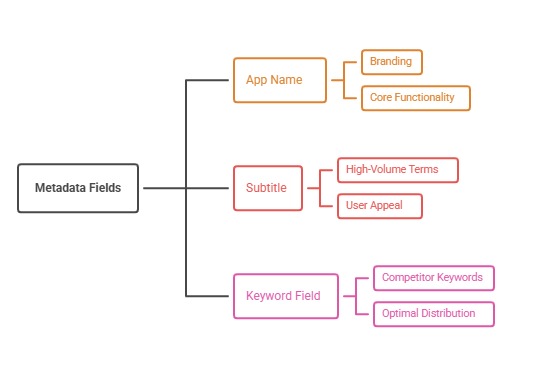
In ASO, wasteful overlap usually means repeating the same word in the name, subtitle, and keyword field, which spends limited space without adding coverage. The fix is to assign each concept to one field and use the remaining space for different relevant terms.
What waste looks like
On iOS, words in the name, subtitle, and keyword field can combine into phrases, so repeating a word across fields rarely helps. Plurals, stop words, and repeated brand names also consume space.
Review your fields side by side to find duplicates.
Allocate concepts to fields
Create a sheet listing each target concept and the field that carries it. Use the name and subtitle for the most valuable concepts and the keyword field for supporting terms.
Confirm current indexing behavior in the stores documentation and your own tests.
Google Play differences
Google Play indexes longer text, so repetition has different trade-offs. Natural repetition for clarity is fine, but forced repetition harms readability and may breach policy.
Write for humans first.
Audit regularly
Re-audit after changes in positioning or competitors. Record each metadata change so you can attribute movement.
Remove terms that do not produce qualified visibility.
Common mistakes with keyword cannibalization ASO
The classic mistake is repeating the same word in the name, subtitle, and keyword field. Another is using plural and singular versions that the store already treats alike. Brand names repeated in the keyword field are a third.
Some teams also fill every available character with weak terms instead of leaving room for stronger ones.
Keyword cannibalization ASO: a worked example
A fitness app lists workout in the name, workout plans in the subtitle, and workout, workouts, plans in the keyword field. An audit finds the repetition and replaces it with distinct terms such as strength, beginner, home, and timer.
The team tracks visibility for the new terms and keeps the ones that produce qualified traffic.
How to do it, step by step
- Export all fieldsPut name, subtitle, and keyword field side by side.
- Mark duplicatesHighlight repeated words and plural variants.
- Assign concepts to fieldsGive each concept one field.
- Replace wasted spaceFill freed space with new relevant terms.
- Log the changeRecord the date and track visibility.
Before and after examples
Illustrative examples written for a generic app in this category, not client results. Swap in your own product, audience, and data.
FitFlow Workout Planner
FitFlow Workout Planner
Why it works: Keep the main terms in the name.
Workout plans and routines
Strength plans for beginners
Why it works: It adds new concepts.
workout,workouts,plans,plan
beginner,home,timer,dumbbell,stretch
Why it works: Duplicates are replaced with new terms.
Action plan
- Compare name, subtitle, and keyword fields
- Remove repeated words
- Assign one field per concept
- Keep Google Play copy natural
- Audit after positioning changes
- Log every change
Metrics to monitor
- Keyword coverage per field
- Unique relevant terms
- Visibility for added concepts
- Change log completeness
Record the baseline, release date, audience, markets, and external changes before interpreting movement. Rankings and conversion are useful signals, but a decision is stronger when activation, retention, and business value confirm that the page attracted the right users.
Frequently asked questions
Does repeating a word help ranking?
Generally not on iOS; use the space for different terms.
Is repetition fine on Google Play?
Natural repetition is fine; stuffing is not.
How often should I audit?
Whenever strategy changes and periodically.
Keep reading
More in Metadata Craft
Browse all 10 Metadata Craft guides