Introduction
Keyword density is one of the oldest ideas in search marketing, and one of the most misunderstood when it gets carried over into App Store Optimization. Many teams still assume that repeating a target keyword as many times as possible inside an app description will push rankings higher. Others swing the opposite direction and avoid keyword repetition almost entirely, worried that any repetition looks spammy.
The truth sits in the middle, and it depends heavily on which store you are optimizing for. Apple's App Store and Google's Play Store handle keyword indexing in fundamentally different ways, and treating them identically is one of the most common mistakes we see when auditing new client accounts at ASOWin.
This guide breaks down where keyword density genuinely still matters, where it is a myth left over from old web SEO habits, and where the line sits between smart optimization and the kind of keyword stuffing that gets listings flagged.
Short Answer: How Much Keyword Density Is Too Much?
On Google Play, a natural keyword density of roughly one to two mentions of your primary term per hundred words of long description, written inside real sentences, is a safe and effective range. On the Apple App Store, keyword density in the visible description does not directly affect ranking at all, since Apple relies on a separate 100-character hidden keyword field that works on individual word matching, not repeated phrases. Optimizing for density where it does not apply, or overdoing it where it does, both create the same risk: a listing that reads as manipulative rather than useful.
What Keyword Density Actually Means in ASO
Keyword density refers to how often a specific term or phrase appears relative to the total word count of a piece of copy. In traditional web SEO, this concept has been mostly retired in favor of topical relevance and semantic coverage, but app stores still have some fields where literal word repetition genuinely factors into indexing.
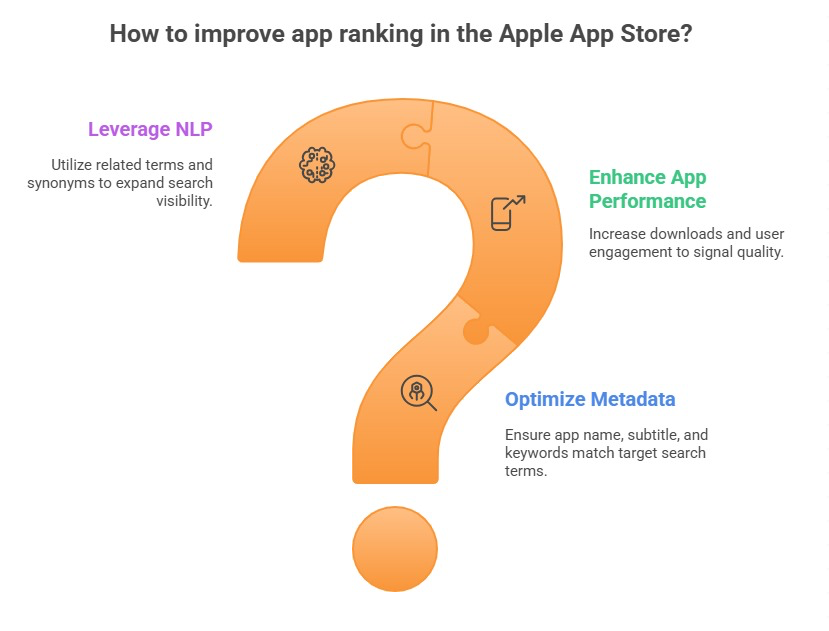
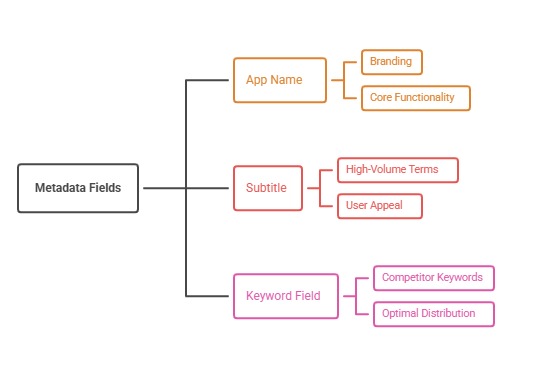
The confusion in ASO comes from treating the entire app listing as one undifferentiated block of text. In reality, each platform splits metadata into distinct fields, and each field behaves completely differently when it comes to how keywords are read and weighted.
It also helps to separate two goals that often get merged into one conversation: ranking and readability. Ranking is about whether the store's search algorithm associates your listing with a given query. Readability is about whether a human who lands on your listing understands, in a few seconds, what your app does and why it is worth installing. Keyword density decisions should always be evaluated against both goals at once, not just the first one, because a listing that ranks well but reads poorly still fails at the point that actually matters most: the install decision.
Why the App Store Keyword Field Is Not About Density
Apple gives every app a hidden 100-character keyword field that never appears to users but plays a major role in search matching. A common misconception is that this field works like a mini description, where repeating a word or writing full phrases helps reinforce relevance.
How Apple's Hidden Keyword Field Really Works
Apple's system treats the keyword field as a pool of individual words separated by commas, then recombines those words with your app name and subtitle to match a much wider range of search queries than the raw character count suggests. Repeating a word inside this field wastes precious characters without adding ranking benefit, since the algorithm already considers each word once it appears. The smarter approach is maximizing unique word coverage, not repetition, which is a core part of how we approach any keyword installs strategy for iOS apps.
The visible App Store description, the long block of text users actually read before installing, plays essentially no role in Apple's search ranking algorithm. It exists purely to persuade users to install once they have already found your listing, which means it should be optimized for clarity and conversion, not keyword density.
This distinction trips up teams migrating strategies from Android to iOS, or from general web SEO backgrounds into ASO for the first time. Years of habit around repeating target phrases in visible copy simply does not transfer to Apple's system. Spending time carefully repeating a keyword three or four times in an App Store description is, at best, neutral for ranking and, at worst, a wasted opportunity to instead write copy that actually convinces a hesitant user to tap install.
Why Google Play Density Actually Matters
Google Play works differently. Google indexes the full long description, up to four thousand characters, for search relevance, closer to how traditional web pages are indexed. This means genuine keyword presence in that description does influence which search queries your Android app can rank for.
This does not mean more repetition automatically means better rankings. Google's broader indexing systems, the same ones described in Google's search spam policies, are built to detect and penalize unnatural repetition patterns regardless of the surface they appear on. A long description that reads as a list of repeated keyword phrases rather than genuine, helpful copy risks both a poor user experience and a lower quality signal internally.
The Line Between Smart Optimization and Keyword Stuffing
The clearest test for whether copy has crossed into stuffing territory is simple: read it out loud as if explaining the app to a friend. If a sentence sounds unnatural, listy, or repetitive when spoken aloud, it has likely crossed the line.
- Smart optimization: "Track your workouts, log meals, and build a sustainable fitness routine with our simple workout tracker."
- Keyword stuffing: "Best workout tracker, fitness tracker, workout log, fitness app, workout planner, fitness routine tracker for workouts."
The first example uses the core keyword once, in a sentence that reads naturally and communicates real value. The second crams multiple variations of the same term with no regard for readability, which is exactly the pattern that both platforms' quality systems are designed to catch.
How Keyword Density Interacts With Ranking Factors Beyond Text
Keyword density is only one input among many ranking signals that determine where an app appears in search results. Apple and Google both weigh ratings, review sentiment, install velocity, retention, and update frequency alongside metadata relevance. Our guide to Apple App Store ranking factors for 2026 covers this full picture in detail, and it is worth understanding before assuming a description rewrite alone will move rankings meaningfully.
Overweighting keyword density while ignoring these other factors is a common trap. A perfectly worded description will not compensate for a 2.8-star rating or a listing that fails to convert once users arrive.
We also see this trap show up as a timing issue. Teams will rewrite a description for density, wait a few days, see no ranking movement, and conclude that keyword density does not work at all. In most of these cases, the real issue is that other, heavier-weighted ranking factors, like retention or review sentiment, have not shifted, so the description change alone was never going to be enough to move the needle on its own. Isolating variables, and giving each change enough time to actually register in the store's ranking system, is essential before drawing conclusions about what worked and what didn't.
Why Semantic Coverage Now Matters More Than Exact Repetition
Modern app store algorithms, much like modern web search engines, increasingly reward semantic relevance over literal keyword repetition. A description that naturally covers related concepts, synonyms, and use cases can rank for a broader set of queries than one that repeats a single exact phrase multiple times. This is the central argument in our piece on why semantic intent matters more than exact keyword matching, and it directly changes how a description should be written.
Rather than asking "how many times should I repeat this keyword," a more useful question is "does this description clearly and thoroughly explain what my app does, in language real users would recognize." Density becomes a secondary consideration once the primary goal, genuine topical coverage, is met.
A Practical Framework for Writing Density-Safe Descriptions
At ASOWin, we use a straightforward framework when writing or auditing app descriptions. Start by identifying one primary keyword phrase and two to four secondary variations. Write the description as genuinely helpful copy first, focused on real benefits and features. Then check where the primary phrase naturally lands, typically two or three times across a full-length Play Store description, and confirm it never appears in a way that breaks the sentence's natural flow.
- Lead with the strongest value proposition in the first one to two sentences, since this is what users see before tapping "read more"
- Use secondary keyword variations naturally throughout supporting paragraphs rather than repeating the primary term
- Break up long blocks of text with short paragraphs, bullet points, or feature lists for readability
- Avoid comma-separated keyword lists disguised as sentences
- Re-read the final draft as a user, not as a search algorithm
This framework keeps density in a healthy range automatically, without needing to count occurrences manually or hit an arbitrary percentage target.
Density Alone Will Not Fix a Weak Listing
It is worth being direct about a limitation many teams overlook: even a perfectly optimized description will not compensate for a listing that fails to convert once users land on it. Keyword density affects who finds your app; it does very little for whether they actually install once they arrive. That second half of the equation depends on icon design, screenshots, ratings, and overall conversion rate, which is covered in depth in our guide to App Store conversion rate optimization.
Treating keyword research, as covered in our broader guide to keyword research tools for ASO, and description writing as two separate steps in the same pipeline, rather than one merged task, tends to produce far better results than trying to optimize for ranking and conversion simultaneously in a single pass.
Final Answer: Getting Keyword Density Right
Keyword density in app descriptions is not a myth, but it is also not a universal rule. On the App Store, it barely applies at all, since the hidden keyword field rewards unique word coverage rather than repetition, and the visible description exists purely for conversion. On Google Play, moderate, natural keyword presence in the long description genuinely supports ranking, but only within copy that still reads as helpful, human writing rather than a list of repeated terms.
For a broader view of how description writing fits into a complete optimization plan, our App Store Optimization checklist for 2026 walks through the full process, and more strategy breakdowns are available on our blog. If you want a team that already knows exactly where the line sits between optimization and spam, ASOWin can audit and rewrite your listings with both ranking and conversion in mind.