Introduction
Every year, App Store Optimization gets a little more demanding. Store algorithms shift, users get pickier, and new surfaces like AI-driven search overviews and personalized recommendations change how apps get discovered. A checklist that worked in 2023 will leave gaps in 2026.
At ASOWin, we build this checklist from what we actually see working across hundreds of app listings, not from generic best-practice lists. This guide walks through every stage of a modern ASO program: keyword research, metadata, creative assets, reviews, localization, technical health, competitor tracking, and measurement.
Whether you run ASO in-house or work with a partner, use this as the master reference for planning your next optimization cycle. We have organized it so you can either work through it top to bottom during a full audit, or jump to the specific stage where you suspect your current gaps sit.
One thing worth setting expectations on early: a checklist like this is not meant to be completed once and filed away. The apps that consistently outperform their category peers treat every section below as a recurring workstream, revisited on its own cadence, rather than a single sprint that ends when the metadata is updated.
Short Answer: What Should Be on Your ASO Checklist for 2026?
A complete 2026 ASO checklist should cover keyword research and mapping, title and metadata optimization for both the App Store and Play Store, icon and screenshot testing, review and rating management, localization for priority markets, technical store listing health, competitor benchmarking, and a consistent measurement cadence. Skipping any one of these areas leaves visibility, conversion, or retention on the table.
Why ASO Checklists Need to Evolve Every Year
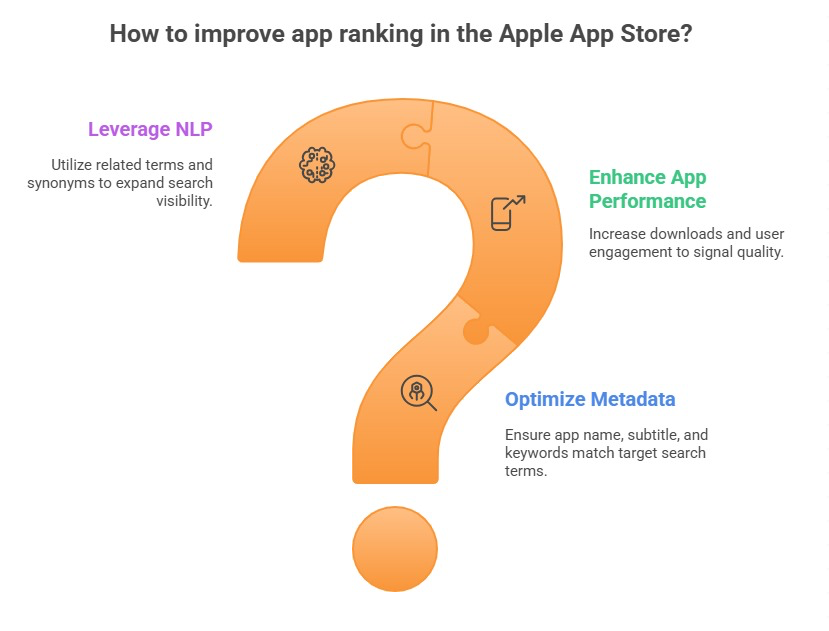
Store search algorithms are not static. Apple and Google both continue to refine how they weigh keyword relevance, engagement signals, retention, and review quality when ranking apps. What counted as a strong optimization two years ago can now be table stakes.
At the same time, competition has intensified in nearly every category. More developers understand the basics of App Store Optimization, which means the apps that win are the ones executing the fundamentals more consistently and testing more aggressively, not the ones who simply know the fundamentals exist.
This checklist is built to reflect that reality. It is organized as a sequence, but in practice these workstreams run in parallel and feed into each other continuously.
Step 1: Keyword Research and Mapping
Keyword strategy is the foundation everything else builds on. Before touching a single line of metadata, you need a clear picture of what your audience actually searches for, how competitive each term is, and where the real opportunity sits.
A thorough keyword research process should include:
- Brainstorming seed terms based on your core use cases and value proposition
- Expanding seed terms using autosuggest, related searches, and keyword tools
- Scoring each keyword by search volume, difficulty, and relevance
- Mapping approved keywords to specific metadata fields
- Flagging branded and competitor terms worth monitoring
We cover the ranking side of this in detail in our breakdown of App Store ranking factors for 2026, which explains how Apple weighs keyword relevance against engagement and conversion signals, and our companion guide to Google Play ranking strategies, which covers the same ground for Android.
A useful practice at this stage is separating keywords into tiers based on both opportunity and intent. Head terms tend to carry the highest search volume but also the fiercest competition, while mid-tail and long-tail phrases often convert at a noticeably higher rate because the searcher already knows more specifically what they want. A balanced keyword map pulls from all three tiers rather than chasing only the biggest numbers on a research tool's dashboard.
It also helps to revisit this research on a fixed schedule rather than only when rankings start slipping. Search behavior shifts as new competitors enter a category, as platform features change, and as user vocabulary evolves, so a keyword map that was accurate six months ago may already be missing newer, high-intent terms.
Step 2: Metadata Optimization
Once your keyword map is set, metadata is where those keywords actually get placed. This is also where iOS and Android diverge the most, which is why we go deeper on the platform-specific mechanics in our iOS vs Android ASO comparison.
iOS Metadata Fields
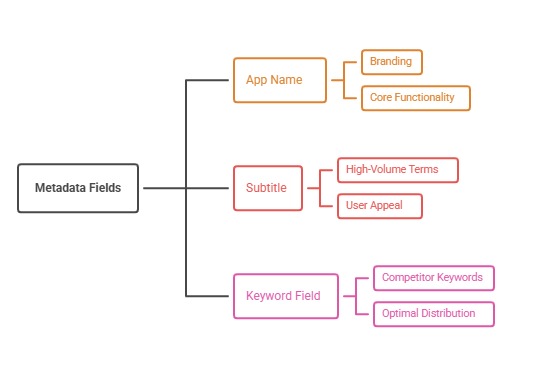
On the App Store, prioritize your highest-value terms in the app name and subtitle, since these carry the most ranking weight. The 100-character hidden keyword field should be filled with additional relevant terms, avoiding duplication of words already in the name or subtitle since Apple treats those as already indexed.
Android Metadata Fields
On Google Play, the title, short description, and long description all contribute to keyword relevance, with the long description in particular allowing for natural keyword density without triggering spam flags. Google also crawls the long description for context, so it should read naturally while still reinforcing your priority terms.
According to Google Play's own store listing guidance, listings should accurately represent the app and avoid keyword stuffing in any field, which reinforces why natural, benefit-led copy consistently performs better than forced repetition.
Step 3: Creative Assets - Icon, Screenshots, and Video
Metadata gets users to your listing. Creative assets decide whether they install. Your icon needs to be legible at small sizes and distinct from competitors in the same category. Screenshots should lead with your strongest value proposition in the first two frames, since most users never scroll past them.
- Test icon variations using store experimentation tools before committing at scale
- Lead screenshots with outcomes, not just feature call-outs
- Use preview videos for categories where product demonstration builds trust, such as games or complex utilities
- Refresh creative sets at least quarterly to avoid conversion fatigue
Apple's guidance on Product Page Optimization makes clear that testing creative variations against real traffic, rather than relying on internal opinion, is the most reliable way to improve conversion.
When you plan a creative refresh, treat it as a hypothesis rather than a redesign for its own sake. Ask what specific belief or objection you are trying to address with the new set, whether that is proving ease of use, showcasing social proof, or clarifying pricing, and design the sequence of screenshots around answering that one question clearly before moving to secondary messaging.
Step 4: Reviews and Ratings Management
Ratings and reviews are one of the strongest trust signals a store listing has, and they influence both conversion and, in many cases, ranking. A checklist item that is easy to skip but costly to ignore is an active review response process.
At minimum, your team should be monitoring incoming reviews for recurring complaints, responding to negative reviews with genuine fixes or acknowledgment, and prompting satisfied users for ratings at the right moment in their journey, never immediately at first open.
It is worth assigning clear ownership here. When review monitoring falls between teams, with support handling tickets and marketing handling the store listing, recurring product complaints often go unaddressed for months even though they are visible in plain sight on the public listing. A short weekly review of new feedback, cross-shared between product and growth teams, tends to catch these issues far earlier.
Step 5: Localization for Global Markets
If your app is available in multiple regions but your metadata is only in English, you are leaving organic installs on the table. Localization is not just translation. It means adapting keyword strategy per market, since search behavior and terminology vary by language and culture, and adapting screenshots to reflect local currency, use cases, or cultural context.
Prioritize localization for markets where you already see meaningful organic or paid traffic before expanding to smaller regions.
Step 6: Technical and Store Listing Health
A checklist item many teams overlook entirely is the technical health of the listing itself. This includes making sure app size stays reasonable for the markets you serve, crash rates remain low, the app supports the latest OS versions, and store listing information like age rating, category, and permissions are accurate and current.
- Confirm category selection still matches your closest competitors and target audience
- Audit permission requests to ensure none feel invasive or unexplained
- Check that in-app purchase and subscription information displayed in the store matches the actual product
Technical health also includes making sure your listing does not create friction before a user even reaches the install button, such as a slow-loading preview video, missing screenshots for a supported device size, or an outdated build that fails on the latest OS release. These issues rarely show up in keyword or conversion reports directly, which is exactly why they need a dedicated place on your checklist rather than being assumed to be someone else's responsibility.
Step 7: Competitor Benchmarking
ASO does not happen in a vacuum. Every checklist cycle should include a review of how your top three to five competitors are positioning themselves: what keywords they rank for that you do not, how their screenshots have changed, and how their rating trend compares to yours.
This benchmarking work often reveals both threats and opportunities, such as a competitor neglecting a high-value keyword you can now target more aggressively.
Beyond keywords, it is worth tracking how competitors' creative sets and messaging evolve over time. A competitor that shifts from feature-focused screenshots to outcome-focused ones, or that starts leaning heavily on social proof in their first screenshot, is often signaling that they have already tested and validated a new approach. Watching for these shifts can shortcut your own testing timeline considerably.
Step 8: Measurement, KPIs, and Reporting Cadence
None of the previous steps mean much without measurement. A proper ASO program tracks impressions, product page views, conversion rate, keyword rank movement, and downstream retention, then reviews these metrics on a regular cadence rather than sporadically.
We break down exactly which metrics matter and how to build a reporting dashboard in our dedicated guide to ASO metrics and KPIs to track.
Common Pitfalls That Break Even Good Checklists
Having a checklist is not the same as executing it well. The most common failure points we see include treating ASO as a one-time launch task instead of an ongoing system, copying the same metadata strategy across both stores without adapting it, and making creative or metadata changes without tracking their impact against a baseline.
At ASOWin, we treat every checklist item as part of a continuous testing loop rather than a box to tick once and forget.
Another subtle pitfall is over-indexing on a single lever, usually keywords, while neglecting how those keywords actually connect to the rest of the listing. A perfectly optimized title paired with outdated screenshots and an unmanaged review section will still underperform, because visibility gains only translate into growth once the rest of the funnel is ready to convert that additional traffic.
Conclusion: Turning This Checklist Into a Growth System
A checklist is only useful if it becomes a repeatable habit. The apps that win in 2026 will be the ones that revisit keyword strategy regularly, keep creative assets fresh, respond to user feedback quickly, and measure everything against clear KPIs.
At ASOWin, we help app teams turn this exact checklist into an operating rhythm, running keyword research, metadata updates, creative testing, review management, and reporting as one connected system rather than isolated tasks.
If you want a partner to run this checklist for you end to end, explore our App Store Optimization services or browse more strategy guides on our ASO blog.