Introduction
It is tempting to treat App Store Optimization as one universal skill set. Write good metadata, add the right keywords, use strong screenshots, and both platforms should respond the same way. In practice, the Apple App Store and Google Play Store are different search engines with different rules, and treating them identically is one of the fastest ways to underperform on both.
At ASOWin, we build separate keyword maps, metadata strategies, and creative testing plans for iOS and Android because the underlying mechanics genuinely diverge. This guide walks through exactly where those differences matter most and what a platform-aware ASO strategy looks like in practice.
If you have not yet worked through the fundamentals, our complete App Store Optimization checklist for 2026 is a good starting point before diving into platform-specific nuance.
The stakes for getting this right keep rising. Many apps now split traffic fairly evenly between iOS and Android, and a strategy that quietly underperforms on one platform can easily hide behind strong numbers on the other, making the shortfall harder to spot until it shows up as a meaningful gap in category share.
Short Answer: What Is the Key Difference Between iOS and Android ASO?
The key difference is how each store indexes keywords and structures metadata. Apple relies on the app name, subtitle, and a hidden 100-character keyword field, while Google Play indexes the title, short description, and the entire long description text. This single structural difference changes almost every other decision in your ASO strategy, from keyword density to how you plan custom listings.
| App Store (iOS) | Google Play (Android) | |
|---|---|---|
| Title | App name, up to 30 characters | Title, up to 30 characters |
| Second text field | Subtitle, up to 30 characters | Short description, up to 80 characters |
| Keywords | Hidden keyword field, 100 characters | No keyword field; the full description is indexed |
| Long description | Not used for search ranking | Up to 4,000 characters, indexed for search |
| Alternate listings | Custom product pages, up to 70 | Custom store listings, up to 50 |
| Native A/B testing | Product page optimization | Store listing experiments |
| Rating shown | Per country, can be reset with a new version | Weighted toward recent ratings, per country and device |
Why Ranking Algorithms Are Not Interchangeable
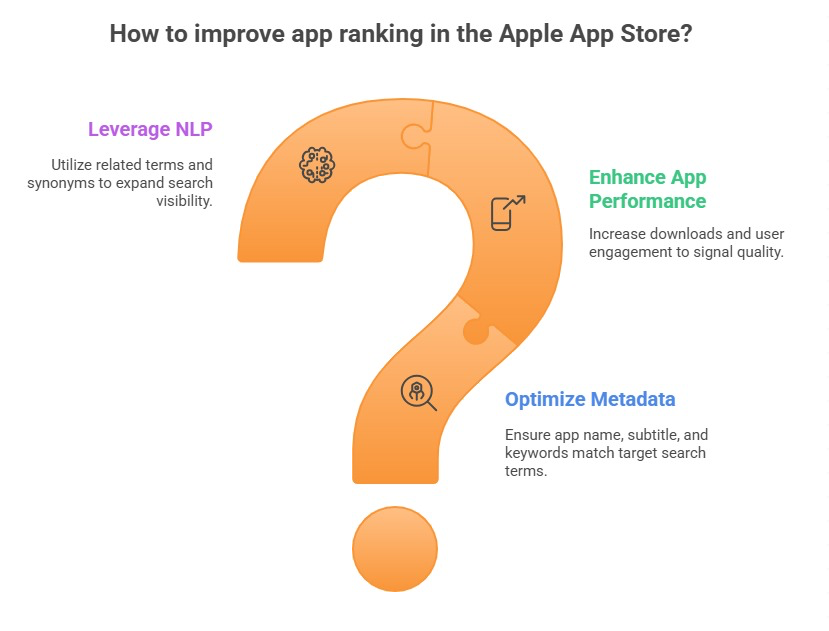
Both Apple and Google evaluate keyword relevance, download velocity, engagement, and ratings when deciding how to rank an app for a given search term. But the weighting behind those signals is proprietary and different for each store. We go into the specific signals in more depth in our guide to App Store ranking factors for 2026 and our companion piece on Google Play ranking strategies.
In practice, this means a keyword that ranks well for your app on iOS may sit several positions lower on Android, even with near-identical metadata, simply because the platforms score relevance and quality signals differently.
Download velocity is a good example of this divergence. Both stores reward apps that see a sudden, sustained increase in installs with a temporary ranking boost, but the sensitivity to that spike, how quickly it takes effect and how long it lasts, differs between platforms. A launch or campaign timed well on one store may not produce the same ranking lift on the other, which is a common source of confusion for teams running simultaneous cross-platform launches.
Metadata Fields: Where the Real Differences Begin
App Store Metadata Structure
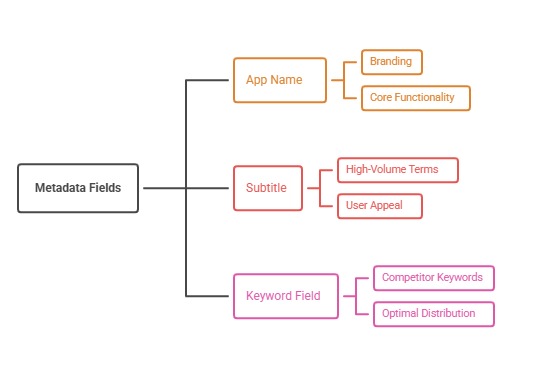
On iOS, you get an app name of up to 30 characters, a subtitle of up to 30 characters, and a hidden keyword field of 100 characters that users never see but that Apple indexes for search. Because the keyword field is invisible to users, it should be treated purely as a technical asset, packed with high-value terms separated by commas with no wasted spaces.
Apple explicitly documents how these fields should be used in its own App Store product page guidelines, which is worth reviewing before finalizing metadata changes.
Google Play Metadata Structure
On Android, you have a 30-character title, an 80-character short description, and a 4,000-character long description. Unlike Apple, Google actually crawls the long description for keyword relevance, which means the copy needs to read naturally while still reinforcing your priority terms throughout, rather than treating it purely as marketing copy.
This structural difference is exactly why a strategy built only around short, punchy iOS-style copy will underperform on Android, where there is far more room, and more expectation, for descriptive keyword-rich content.
A practical way to think about the difference: your iOS metadata should read like a highly compressed pitch, since every word carries weight in a tightly constrained space, while your Android long description can behave more like a mini landing page, with room to cover use cases, feature depth, and social proof in a way that also happens to reinforce your keyword targets naturally throughout.
Keyword Field Strategy: Hidden vs Crawled
Because Apple's keyword field is hidden and limited to 100 characters, prioritization matters enormously. Every character counts, and duplicating a word already used in the name or subtitle wastes space since Apple already indexes it there.
On Android, because the long description is both visible and crawled, teams often build a completely different structure: leading with a compelling value proposition for human readers, then naturally weaving in secondary and long-tail keywords through the body of the description.
- iOS: prioritize dense, non-duplicated keyword coverage in the hidden field
- Android: prioritize natural, readable keyword integration across the long description
- Both: keep your app title focused on your primary brand and category term
Custom Product Pages vs Custom Store Listings
Apple's Custom Product Pages and Google's Custom Store Listings solve a similar problem in different ways. Both let you build variant listings tailored to a specific traffic source, campaign, or audience segment without altering your default listing.
Apple allows up to 70 custom product page variations that can be linked to specific ad campaigns or external links, while Google Play's custom store listings can be targeted by country, or tied to specific acquisition sources. Neither tool replaces core ASO work, but both are powerful for testing messaging against specific segments before rolling changes into your default listing.
Where these tools genuinely shine is in reconciling paid and organic strategy. A campaign targeting a specific user segment, say small business owners rather than freelancers, can point to a custom listing variant that speaks directly to that segment's language and pain points, rather than forcing every visitor through the same generic default page regardless of how they arrived.
Screenshot and Creative Differences
Screenshot dimensions, safe zones, and even user browsing behavior differ between the two stores. iOS users often see your first two to three screenshots before deciding whether to tap into the full listing, while Android's listing layout can expose slightly more of your visual assets earlier in the browsing experience.
Video previews also behave differently: Apple auto-plays app previews under certain conditions, while Google Play's promotional video sits more prominently near the top of the Android listing. These behavioral differences should shape which message goes in your very first visual asset on each platform.
App icons carry slightly different design conventions between the two ecosystems as well. iOS icons tend to favor simpler, flatter designs that align with the platform's broader design language, while Android has historically allowed for more varied shapes and styles across devices and launchers. Testing an icon that feels native to each platform, rather than forcing one universal design, often performs better in practice.
Reviews, Ratings, and Prompt Timing
Both platforms support star ratings and written reviews, along with developer responses, but the systems are not identical. Review prompt timing rules, how prominently the rating displays, and how ratings factor into ranking all vary slightly between Apple and Google, which is why review management strategies should account for platform nuance rather than treating both the same.
User expectations around reviews also differ by platform and, in some cases, by region. Android users in certain markets are often more willing to leave detailed written reviews, while iOS users in the same market may lean toward simply leaving a star rating without commentary. Understanding these behavioral patterns helps set realistic expectations for how much qualitative feedback you can expect to gather on each store.
Category and Discovery Differences
Category structures also differ. The categories available, how subcategories work, and how charts and featured placements are curated vary meaningfully between the App Store and Google Play. An app that fits neatly into one category on iOS might have a more ambiguous fit on Android, or vice versa, which affects both organic discovery and paid targeting decisions.
Featured placements and editorial curation work differently between the two stores as well. Apple's editorial team manually curates collections and Today tab features, which rewards apps with strong storytelling and design polish, while Google Play's discovery surfaces lean more heavily on algorithmic recommendations tied to user behavior and engagement patterns. Neither path can be reliably forced, but understanding which one is more relevant to your app's strengths helps prioritize where to invest creative and product effort.
Common Mistakes When Treating Both Stores the Same
The most frequent mistake we see is copying iOS metadata directly into the Android long description field, wasting the crawlable space Google actually rewards. A close second is applying the same screenshot set to both stores without adjusting for dimension and safe zone differences, which can crop or distort key visual elements.
We cover several more of these patterns, along with how to fix them, in our guide to common ASO mistakes that hurt app downloads. A third mistake worth flagging separately is assuming a single review response policy works everywhere, when in reality the tone and cadence users expect from developer responses can vary by platform and by region just as much as the review volume itself does.
Building a Platform-Aware ASO Strategy
At ASOWin, our process starts with two separate keyword maps, one per platform, even for the same app. From there, metadata, creative testing plans, and localization priorities are built to reflect each store's specific mechanics rather than a shared template.
This does not mean doubling your workload. It means being deliberate about where the platforms genuinely diverge and where they can share strategy, such as core brand positioning or high-level creative concepts, while still adapting execution to each store's rules.
In practice, a good rule of thumb is to share your brand voice, core value proposition, and high-level visual identity across both platforms, while letting keyword density, metadata length, screenshot sequencing, and localization priorities flex independently per store. This keeps your brand consistent to users who encounter you on both platforms, without forcing a one-size-fits-all execution that shortchanges either store's specific mechanics.
Conclusion: Two Stores, Two Strategies, One Goal
iOS and Android ASO share the same end goal: getting the right users to discover, trust, and install your app. But the mechanics of how each store indexes keywords, structures metadata, and surfaces creative assets are different enough that a single copy-paste strategy will consistently underperform a platform-aware one.
At ASOWin, we build distinct, coordinated strategies for both stores as part of our full App Store Optimization services, so your app performs at its best on whichever platform your users are searching.
If your team currently runs a single shared checklist for both stores, the simplest next step is not to throw it out, but to split it into two tracks at the metadata and keyword stage while keeping brand and creative concept shared upstream. That one change tends to surface the platform-specific gaps fastest, without requiring a complete rebuild of your existing ASO process.
For more platform-specific strategy guides, browse the rest of our ASO blog, where we cover both App Store and Play Store growth in depth.