
Introduction
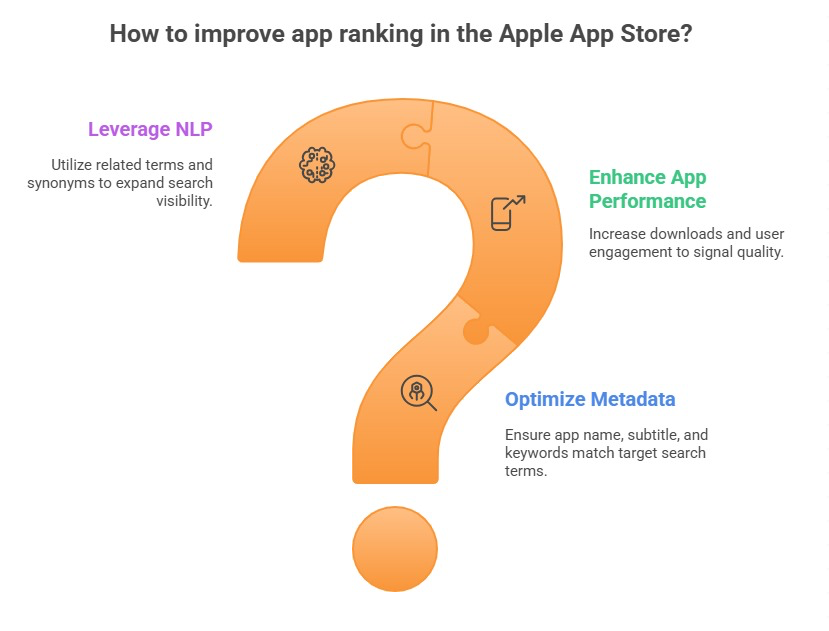
Most apps that struggle with downloads are not failing because of a bad product. They are failing because of small, avoidable mistakes scattered across their store listing, keyword strategy, and review management. Individually, each mistake might feel minor. Together, they quietly cap how many users ever find and install the app.
At ASOWin, we audit dozens of app listings every month, and the same patterns keep showing up regardless of category. This guide walks through 15 of the most common ASO mistakes we see, along with what to do instead.
We have grouped these 15 mistakes into four broad categories: keyword strategy errors, creative and listing errors, reputation and trust errors, and platform and process errors. Reading them in this order helps illustrate how a single weak spot in one area, say a stale keyword map, tends to create knock-on problems in the areas that follow, such as underperforming creative that never gets the traffic volume needed to prove itself.
If you want the positive version of this guide, our complete App Store Optimization checklist for 2026 lays out exactly what a healthy ASO program should include.
What makes these mistakes especially costly is that they rarely show up as a single dramatic failure. Instead, they quietly compound over months, chipping away at impressions, conversion, and trust a little at a time, until a team eventually notices that downloads have stalled without any obvious single cause.
Short Answer: What Are the Most Damaging ASO Mistakes?
The most damaging ASO mistakes are keyword stuffing, generic screenshots that fail to communicate value quickly, ignoring reviews and ratings, applying the same strategy to both the App Store and Google Play, skipping localization for active markets, and treating ASO as a one-time launch task instead of an ongoing system. Fixing even three or four of these can meaningfully improve visibility and conversion, especially when the fixes are paired with clear before-and-after measurement.
Mistakes 1 Through 3: Keyword Strategy Errors
1. Keyword Stuffing Across Metadata
Repeating the same term across the title, subtitle, and description does not multiply your ranking chances. It reads poorly to users and can flag your listing during store review. Google's own spam policies make clear that unnatural keyword repetition is treated as a quality signal, not a ranking booster, and the same principle carries over to app store metadata.
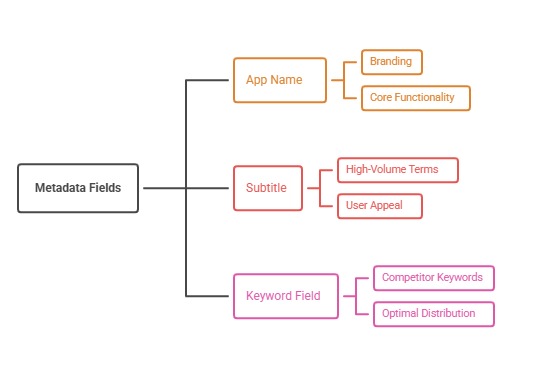
The fix is straightforward but requires discipline: map each priority keyword to exactly one primary field, and let synonyms and related phrases fill in secondary fields instead of repeating the exact same term everywhere it fits.
2. Ignoring Long-Tail Keywords
Many teams chase only the highest-volume, most competitive terms and ignore longer, more specific phrases that convert at a higher rate with far less competition. A balanced keyword map should include head terms and long-tail variations, since long-tail phrases often deliver a disproportionate share of high-intent, ready-to-install traffic despite their smaller individual search volumes.
3. Never Updating Your Keyword Map
Search behavior shifts as your category evolves. A keyword map built at launch and never revisited will miss new terms competitors are capturing and new phrases users have started searching for, and it will also keep wasting metadata space on terms that have since dropped in relevance or volume.
Mistakes 4 Through 6: Creative and Listing Errors
4. Generic, Feature-Only Screenshots
Screenshots that simply label features without showing a clear outcome fail to convert browsers into installers. The first two or three screenshots need to answer why someone should install, not just what the app technically does. A caption like "Track your expenses" tells a user what a feature is, while a caption built around the actual outcome, such as saving time or money, is far more persuasive in that same limited space.
5. Treating the Icon as an Afterthought
Your icon is often the very first visual signal a user sees, whether in search results, category browsing, or a shared link. An icon that is illegible at small sizes or indistinguishable from competitors quietly suppresses your conversion rate before a user even opens the listing. Because the icon shows up at such small sizes across so many contexts, it deserves the same level of testing rigor as any screenshot, rather than being finalized early and left untouched for years.
6. Never Testing Creative Variations
Relying on internal opinion instead of real experimentation means you are guessing at what converts. Apple's guidance on Product Page Optimization exists specifically because testing creative variations against real traffic consistently outperforms assumption-based design choices. Even a simple test between two screenshot orderings can reveal meaningful conversion differences that internal debate alone would never have surfaced.
Mistakes 7 Through 9: Reputation and Trust Errors
7. Ignoring Reviews and Ratings
Reviews are one of the strongest trust signals on any store listing. Apps that never monitor incoming reviews miss early warning signs of bugs, confusing onboarding, or pricing complaints that are actively suppressing conversion. Because reviews are public, these unresolved complaints keep influencing every future visitor who reads them, long after the original issue could have been addressed.
8. No Response Strategy for Negative Feedback
Leaving negative reviews unanswered makes a brand look inactive. A thoughtful, timely response to a critical review can rebuild trust with both that user and every future user who reads it before installing. A response that acknowledges the specific issue and offers a real path to resolution, rather than a generic template reply, does far more to reassure prospective users browsing the same review section.
9. Requesting Reviews at the Wrong Moment
Prompting for a rating immediately at first open, before a user has experienced any value, tends to produce weaker ratings than prompting after a clear moment of success within the app. A well-timed prompt, placed right after a user completes a meaningful action or milestone, consistently produces both higher ratings and a higher response rate than an interruption on the very first screen.
Mistakes 10 Through 12: Platform and Localization Errors
10. Copying the Same Strategy Across iOS and Android
The App Store and Google Play use different metadata structures and ranking mechanics, which we cover in detail in our iOS vs Android ASO comparison. Applying one identical playbook to both stores routinely underperforms a platform-aware strategy. Even something as simple as porting the same short-form iOS description directly into Android's long description field wastes the crawlable space Google actually indexes for relevance.
11. Skipping Localization for Active Markets
If your app already has meaningful installs or traffic from non-English-speaking regions, leaving metadata untranslated means you are not matching how those users actually search, directly limiting organic discovery in those markets. This gap tends to widen over time, since local competitors who have invested in proper localization keep pulling further ahead in exactly the markets your untranslated listing is quietly losing ground in.
12. Wrong Category Selection
Choosing a category that does not reflect how users actually search for apps like yours, or that puts you against far larger, better-funded competitors unnecessarily, can suppress both browse discovery and chart visibility. Reassessing category fit periodically, especially after a major feature launch or repositioning, is a simple step many teams forget once the initial category choice is made.
Mistakes 13 Through 15: Process and Measurement Errors
13. Treating ASO as a Launch-Only Task
ASO is not something you finish. Apps that optimize once at launch and never return to metadata, creatives, or keyword strategy inevitably fall behind competitors who keep iterating, since store algorithms, user expectations, and the competitive field are all in constant motion even if your listing stays static.
14. No Competitor Benchmarking
Without regularly reviewing how top competitors are positioning their listings, you miss both emerging threats and openings, such as a competitor neglecting a valuable keyword you could now capture. Competitor benchmarking does not need to be constant, but even a monthly scan of your top few rivals' metadata, screenshots, and rating trends can surface useful signal you would otherwise miss entirely.
15. Not Tracking the Right KPIs
Making changes to metadata or creatives without measuring their actual impact on impressions, conversion rate, and keyword rank means you cannot tell what is actually working. We break down exactly which numbers matter in our guide to ASO metrics and KPIs to track. Without this discipline, teams often repeat past mistakes simply because no one can point to clear evidence of what happened the last time a similar change was made.
How to Fix These Mistakes Systematically
The fastest way to correct these issues is not to fix all 15 at once. Start with an honest audit of your current listing against this list, then prioritize based on likely impact: keyword and metadata issues usually affect visibility, while creative and review issues usually affect conversion.
- Audit your current metadata for keyword stuffing or duplication
- Review your first three screenshots against what they actually communicate
- Check whether your review response process exists at all
- Confirm your iOS and Android strategies are genuinely distinct
- Set a recurring cadence for keyword, creative, and competitor review
At ASOWin, this audit-then-prioritize approach is exactly how we start every new client engagement through our App Store Optimization services, following the same full-cycle ASO process we use to fix these mistakes for clients across categories.
If your team lacks the internal bandwidth or expertise to run this audit thoroughly, our guide on how to hire an App Store Optimization expert walks through what to look for in a specialist or partner who can catch these mistakes before they compound.
It also helps to assign a single owner to each category of mistake rather than leaving the entire list as a shared, unassigned responsibility. Keyword and metadata issues often sit best with a growth or marketing owner, creative issues with design, and review management with either support or product, depending on team structure. Clear ownership is usually the difference between a checklist that gets revisited and one that quietly gathers dust after the first audit.
Conclusion: Turning Mistakes Into Momentum
None of these 15 mistakes are unusual. Most growing apps make several of them at once, simply because ASO tends to get deprioritized once the initial launch push is over. The good news is that each mistake on this list has a clear, actionable fix.
At ASOWin, we help app teams identify exactly which of these issues are costing them installs and fix them in a structured, measurable way, rather than guessing at what might be wrong. If your downloads have plateaued, there is a good chance one or more of these mistakes is the reason.
Start small if the full list feels overwhelming. Pick the three mistakes on this list that feel most familiar to your current listing, fix those first, and measure the impact before moving on to the rest. Momentum built from an early, visible win tends to make the remaining fixes far easier to prioritize and execute.
Revisit this same list again in three to six months. Categories evolve, competitors adjust, and a mistake you fixed once can quietly creep back in if the underlying process that caused it in the first place, whether that is a lack of ownership or a missing measurement habit, was never actually addressed.
For more practical ASO guidance, explore additional strategy breakdowns on our blog.