
Introduction
For years, every visitor to your App Store listing saw the exact same screenshots, video, and messaging, regardless of where they came from. A user who clicked a paid ad, a user who found you through organic search, and a user who tapped a link from a blog post all landed on one identical page.
Custom Product Pages changed that. Apple now allows developers to build multiple tailored versions of their product page, each optimized for a specific audience or traffic source, without touching the core app description or metadata that organic search relies on.
At ASOWin, Custom Product Pages have become one of the highest-leverage tools in our creative testing toolkit, since they let us learn what resonates with different segments and then apply those learnings to the default listing. This is also one of the reasons picking the right ASO agency for App Store optimization matters, since CPP strategy requires the same creative testing discipline as the rest of your listing. This guide explains what CPPs are, how to use them strategically across paid and organic traffic, how to structure a testing program around them, and how to report on results.
Short Answer: What Are Apple Custom Product Pages?
Custom Product Pages are alternate versions of your App Store listing, each with its own screenshots, app preview videos, and promotional text, while keeping the same app name and description. You can create up to 70 variants, assign each one a unique URL, and direct specific traffic sources such as paid ads, social posts, or email campaigns to the version most relevant to that audience.
What Custom Product Pages Actually Are
A Custom Product Page, commonly shortened to CPP, is built inside App Store Connect and lets you customize:
- Screenshots and screenshot captions, fully independent from your default listing
- App preview videos, which can differ entirely from the default video
- Promotional text, the short blurb shown above your description
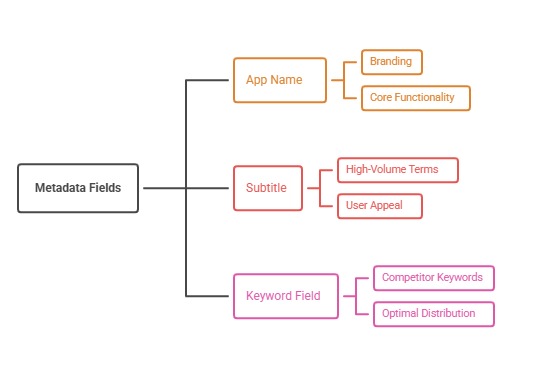
What stays fixed across every CPP is your app name, subtitle, keyword field, and full description. This matters because it means CPPs are a creative and messaging tool, not a metadata or keyword ranking tool. Apple's own documentation on Product Page Optimization outlines the technical setup in detail.
Each CPP is issued a unique URL. That URL is what makes segmentation possible: you place different URLs in different marketing channels, and each visitor sees the version built for the context they arrived from.
It is worth understanding that CPPs are additive rather than a replacement for your default page. Your default product page remains the version that appears in organic App Store search results, category browsing, and the "Today" or "Games" editorial tabs. CPPs only appear when a user arrives through a link you have specifically configured to point at that variant, which is what keeps the feature separate from organic ranking mechanics while still giving you creative flexibility for every other traffic source.
Custom Product Pages for Paid Traffic
The most common and highest-impact use of CPPs is pairing them with paid acquisition campaigns, particularly Apple Search Ads.
When a user clicks a search ad for a specific keyword, that click carries clear intent. A user searching "budget tracker app" has a different mindset than one searching your brand name directly. A well-built CPP strategy matches creative to that intent:
- Ads targeting a specific feature or use case link to a CPP that leads with screenshots for that exact feature
- Ads targeting competitor comparison searches link to a CPP that highlights differentiation directly
- Ads targeting broad category terms link to a CPP with a more general value proposition
- Seasonal or promotional campaigns link to a CPP reflecting that specific offer or moment
This kind of alignment consistently improves conversion rate on paid traffic because the messaging a user sees on the ad and the messaging they see on the landing page reinforce each other rather than feel disconnected. It also improves paid acquisition efficiency, since paid user acquisition campaigns are judged heavily on post-click conversion, not just click-through rate.
There is also a budget efficiency argument for building CPPs around your highest-spend keyword groups first, rather than trying to build a variant for every possible campaign at once. A handful of well-built CPPs mapped to your largest paid spend categories typically produces more measurable improvement than a large number of thin, rarely-visited variants that never accumulate enough traffic to tell you anything useful.
Custom Product Pages for Organic Segments
While CPPs cannot appear in organic search results themselves, they are still valuable for organic-adjacent traffic that arrives through non-search channels.
Examples of organic segments that benefit from a dedicated CPP include:
- Traffic from a blog post or content marketing piece discussing a specific feature
- Social media links shared in a specific campaign or influencer partnership
- Email newsletters promoting a particular use case to existing users or subscribers
- Press coverage or media mentions that focus on a specific angle of your app
Directing each of these to a tailored CPP rather than the generic default listing lets the creative continue the story the user was already engaged with, rather than resetting them to a one-size-fits-all page.
This continuity effect is often underrated. A user who just read a detailed blog post about a specific feature, then lands on a generic App Store page that never mentions that feature prominently, experiences a small but real drop in momentum. A CPP that opens with screenshots directly related to what they just read closes that gap and keeps the user's attention aligned with the reason they clicked through in the first place.
Testing Methodology: Product Page Optimization
Beyond manually assigning CPPs to specific traffic sources, Apple provides a built-in testing tool called Product Page Optimization, which allows a controlled A/B test of up to three treatment variants against your default page using real organic App Store search traffic.
A sound testing methodology follows this structure:
1. Define a Single Hypothesis
Decide what you are actually testing: screenshot sequencing, a different value proposition, an alternate icon, or video versus static-only. Testing multiple variables in one experiment makes results difficult to interpret, the same discipline covered in our screenshot design guide.
2. Run to Statistical Significance
Apple's tool reports on impressions, conversion rate, and statistical confidence for each variant. Ending a test early based on a small sample size is one of the most common mistakes teams make, often leading to false positives that do not hold up over time.
3. Roll Out and Re-Test
Once a variant wins, it should be applied to your default listing where it can benefit all organic traffic, not just the test cohort. From there, the next hypothesis begins, following the same testing cadence outlined in our broader guide to A/B testing for ASO.
One nuance worth planning for is seasonal or app-category volatility. Some apps see natural conversion swings tied to time of year, day of week, or external events unrelated to the creative itself. Running tests across a full week at minimum, and ideally avoiding periods with unusual external activity such as a major press mention or a competitor launch, helps ensure the result you observe reflects the creative change rather than an unrelated spike in traffic quality.
Reporting on Custom Product Page Performance
Because CPPs serve different purposes depending on whether they are tied to paid traffic, organic segments, or formal Product Page Optimization tests, reporting needs to separate these use cases rather than blend them into one generic conversion number.
At ASOWin, we typically structure CPP reporting around three lenses:
- Channel-level conversion: How each CPP performs against the traffic source it was built for, such as a specific ad group or campaign
- Test-level significance: For formal Product Page Optimization experiments, whether the winning variant reached statistical confidence
- Default listing impact: Whether learnings from CPP tests, once rolled into the default page, moved the baseline organic conversion rate
This structure keeps stakeholders focused on the right comparison for each use case, rather than comparing a paid-traffic CPP's conversion rate directly against organic search conversion, which are fundamentally different audiences with different intent levels.
It also helps to document which hypothesis each CPP or test variant was built to answer, and keep that record alongside the performance data. Without this, teams often lose track of why a particular variant exists months later, or repeat a test that was already run and settled. A simple shared log listing the hypothesis, the variant, the result, and the decision made keeps institutional knowledge intact even as team members or agency partners change over time.
How CPPs Fit Into a Broader ASO and Growth Strategy
Custom Product Pages work best as part of a coordinated creative and acquisition system, not a standalone tactic. They connect closely with your video preview strategy, since different CPPs often warrant entirely different video treatments, and with your overall creative testing roadmap.
They also sit at the intersection of paid and organic growth, a relationship we cover in depth in our guide to how full-cycle ASO connects keyword research to conversion, and in our broader breakdown of current app store ranking factors for 2026. For a complete view of where CPP strategy fits inside a full optimization program, see our app store optimization checklist for 2026.
Teams that treat CPPs as an isolated App Store Connect feature, owned entirely by a growth marketer, tend to under-use them relative to teams that bring in the same people responsible for organic metadata and creative strategy. Since CPP screenshots and video often start as adaptations of assets already built for the default listing, or vice versa, keeping the same creative team involved across both reduces duplicated work and keeps visual branding consistent regardless of which page a user actually lands on.
Common Mistakes Teams Make With Custom Product Pages
- Creating too many CPPs without enough traffic to each one to generate meaningful data
- Never linking CPP URLs correctly in ad platforms, so traffic still lands on the default page
- Treating CPPs as a keyword ranking lever rather than a creative and conversion tool
- Letting winning variants sit in a CPP instead of promoting the learning to the default listing
- Building CPPs once and never revisiting them as campaigns, seasons, or audiences shift
Final Answer: Making Custom Product Pages Work for Your App
Custom Product Pages give you a level of creative precision that simply did not exist before on the App Store. Used well, they let you match your messaging to the exact intent of the traffic arriving at your listing, whether that traffic comes from Apple Search Ads, social campaigns, content marketing, or formal Product Page Optimization tests.
At ASOWin, we build CPP strategy as part of a connected system spanning creative testing, paid acquisition, and organic ASO, rather than as an isolated App Store Connect feature. As Apple's platform continues to expand what is possible on the product page, teams that build the internal discipline to test, measure, and reuse learnings now will be better positioned to take advantage of new capabilities as they roll out. Explore more strategies on our ASO blog or talk to our team about building a Custom Product Page strategy for your app.