App Store Connect is Apple's portal for managing apps on the App Store. You use it to create app records, upload and test builds with TestFlight, submit versions for review, edit the product page (name, subtitle, keywords, screenshots, promotional text), set up custom product pages and product page optimization tests, manage pricing and in-app purchases, read analytics and reply to reviews.
App Store Connect areas at a glance
| Area | What it does | ASO relevance |
|---|---|---|
| Apps > App Store tab | Product page metadata, screenshots, previews, versions | Core ranking and conversion fields |
| TestFlight | Beta testing with internal and external testers | Catch issues before reviews |
| Custom product pages | Alternate product pages with unique URLs | Audience and campaign targeting |
| Product page optimization | A/B tests of icon, screenshots and previews | Conversion testing |
| In-app events | Time-limited events on the product page and in search | Discovery and re-engagement |
| Analytics | Impressions, page views, conversion, sources | Measuring ASO results |
| Ratings and reviews | Read and reply to reviews | Reputation and conversion |
Verdict: Most ASO work happens in the App Store tab, product page optimization, custom product pages, in-app events and analytics.
Account access and roles
App Store Connect is available to members of the Apple Developer Program. The account holder can invite users with roles such as Admin, App Manager, Developer, Marketing and Finance. Give each person the least access they need.
See our Apple developer account guide for enrolment.
Creating an app record
Create a new app with its platform, name, primary language, bundle ID and SKU. The name you choose here must be unique on the App Store and becomes your app name field.
Plan the name with ASO in mind; see app title naming strategy.
Uploading builds and TestFlight
Builds are uploaded from Xcode or other tools and appear in TestFlight. Internal testers can test quickly; external testers require a brief beta review.
Product page metadata
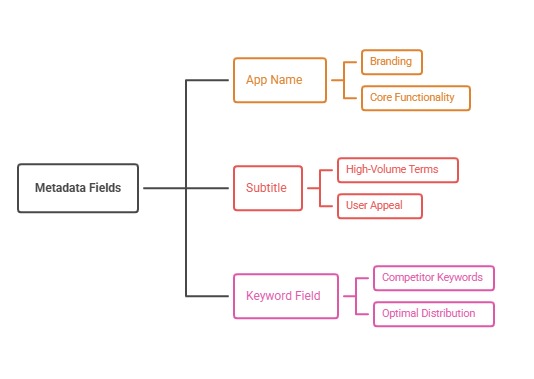
Each version has a name, subtitle, keyword field, description, promotional text, what's new text, support URL and marketing URL. The name, subtitle and keyword field affect search; promotional text can change without a new version.
See the App Store keyword field and promotional text guides.
Screenshots and previews
Upload screenshots and app previews for each required device size and localization. The first screenshots are visible in search results and drive conversion.
See App Store screenshot sizes and first three screenshots strategy.
Submitting for review
Attach a build to a version, complete app review information and submit. You can release automatically, manually or on a scheduled date, and use phased release to update users gradually.
See App Store review time and App Store review guidelines explained.
Custom product pages
Create alternate product pages with their own screenshots, previews and promotional text, each with a unique URL for ads and links. Apple currently allows up to 70 per app.
See custom product pages.
Product page optimization
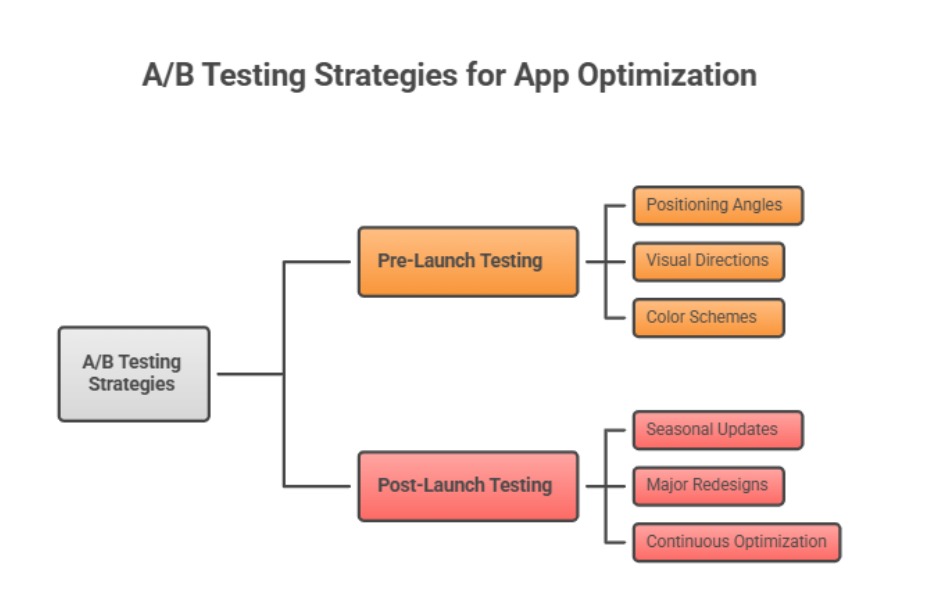
Test up to three treatments of your icon, screenshots and previews against the original using real App Store traffic, then apply the winner.
See product page optimization.
In-app events
In-app events promote time-limited content such as challenges, live events or new seasons. They can appear on your product page, in search and in editorial placements.
See in-app events ASO strategy.
Pricing and in-app purchases
Set app price, availability by country, in-app purchases and subscriptions with introductory offers, promotional offers and offer codes.
See in-app purchase types and subscription pricing.
Analytics
App Store Connect analytics show impressions, product page views, conversion rate, downloads, sales and sources such as App Store search, browse and referrers, plus retention and crashes for opted-in users.
See App Store Connect analytics.
Ratings and reviews
Read and reply to reviews by country, and choose whether to reset your summary rating when releasing a new version.
See ratings reset policy and how to respond to reviews.
A weekly App Store Connect routine
Each week, review analytics by source, reply to reviews, check running product page optimization tests, update promotional text when relevant, and plan metadata changes for the next version.
Keep a log of changes so you can connect results to actions.
Worked example: preparing a version for review
Start by attaching the build that passed TestFlight, then update the keyword field, subtitle and what's new text based on recent keyword research. Upload new screenshots for each required size and localization, and check that promotional text matches current campaigns.
Fill in review notes with demo account details if login is required, choose a manual or scheduled release, and turn on phased release. After approval, release when your team is available to watch crash reports and reviews for the first few days.
Common App Store Connect mistakes
Typical mistakes include repeating title words in the keyword field, uploading screenshots only for one device size, forgetting review notes for apps behind a login, and releasing automatically late on a Friday. Each causes avoidable rejections, wasted keyword space or slow responses to problems.
Teams also often forget that keyword and subtitle changes need a new version. Batch metadata updates with planned releases so every submission carries both product improvements and tested ASO changes.
Using analytics to guide ASO
Compare impressions and conversion by source. Low impressions from search point to keyword or ranking issues; good impressions with weak product page conversion point to creative issues worth testing with product page optimization.
Track results after each version in a simple change log and review them with ASO KPIs so you can see which metadata and creative changes actually moved downloads.
Key takeaways
App Store Connect controls everything users see on your product page and most of the data you need to improve it. Use roles carefully, test builds in TestFlight, and treat each version as a chance to improve metadata.
Custom product pages, product page optimization and in-app events add targeting, testing and discovery on top of the basics. A weekly routine keeps reviews answered and tests moving, which steadily lifts conversion and rankings.
Details teams often overlook
Localizations each have their own name, subtitle and keyword field, so every added language is extra keyword space and a chance to match local searches. Age rating answers, privacy nutrition labels and export compliance questions also need updating when features change, or reviews can stall.
App Store Connect also lets you nominate apps and updates for featuring. A short, clear nomination describing what is new and why it matters gives editors context and costs nothing beyond a few minutes of preparation before launch.
Quick App Store Connect checklist
Before every submission, confirm the right build is attached, metadata is updated for each localization, screenshots cover required sizes, review notes include demo access and the release option is chosen deliberately.
After release, watch analytics by source, reply to new reviews, check crash reports and log what changed. This checklist turns each version into a controlled experiment rather than a guess.
How to do it, step by step
- Set up users and rolesLeast access needed.
- Create the app recordName, bundle ID and language.
- Test with TestFlightInternal, then external testers.
- Optimize the product pageMetadata, screenshots and previews.
- Submit, test and monitorReview, PPO, custom pages and analytics.
Before and after examples
Illustrative examples written for a generic app in this category, not client results. Swap in your own product, audience, and data.
Automatic release on approval.
Scheduled release with phased rollout.
Why it works: Control and safety.
Never changed.
Updated monthly with timely messages.
Why it works: No new version needed.
Guess the best screenshot.
Product page optimization test.
Why it works: Data decides.
Action plan
- Limit roles
- Beta test
- Optimize metadata
- Use custom pages and PPO
- Run in-app events
- Review analytics weekly
Metrics to monitor
- Impressions by source
- Conversion rate
- First-time downloads
- Average rating
- PPO results
Record the baseline, release date, audience, markets, and external changes before interpreting movement. Rankings and conversion are useful signals, but a decision is stronger when activation, retention, and business value confirm that the page attracted the right users.
Frequently asked questions
What is App Store Connect?
Apple's portal for managing apps, builds, product pages, pricing, analytics and reviews on the App Store.
Do I need a paid account to use App Store Connect?
You need membership in the Apple Developer Program to publish apps.
Where do I change my app keywords?
In the App Store tab for the app version, in the keyword field; it changes with a new version.
Can I change promotional text without an update?
Yes, promotional text can be updated anytime.
How do I A/B test my App Store page?
With product page optimization in App Store Connect.
Where are App Store analytics?
In the Analytics section of App Store Connect.
Keep reading
More in Platform Guides
Browse all 16 Platform Guides guides