Introduction
ASO managers already juggle keyword research, metadata testing, review monitoring, creative iteration, and reporting, often across multiple apps and markets at once. ChatGPT and similar language models will not do that job for you, but used well, they can compress hours of research and drafting work into minutes.
The catch is that most people use these tools with vague, generic prompts and get vague, generic output back. Good AI-assisted ASO work depends on specific, well-structured prompts that give the model real context to work with, and a habit of checking the output before it goes anywhere near a live app listing.
This guide covers ten practical ChatGPT prompt patterns ASO managers can use today, organized around real tasks: keyword clustering, review analysis, competitor research, and metadata drafting. It builds directly on our broader look at how AI is transforming App Store Optimization and pairs with our guide to automating ASO reporting with AI.
Short Answer: What Are the Best ChatGPT Prompts for ASO?
The most useful ChatGPT prompts for ASO managers focus on clustering large keyword lists by intent, summarizing review sentiment into actionable themes, drafting first-pass metadata variations, and structuring competitor comparisons. The key is feeding the model real, specific data, your actual keywords, reviews, or competitor listings, rather than asking generic questions, and validating every output against real store data before publishing.
Why Generic Prompts Produce Generic Results
Asking ChatGPT "give me ASO keywords for a fitness app" produces a plausible-sounding but shallow list, because the model has no context about your specific app, audience, or competitive set. The output reads fine, but it is not grounded in your actual keyword data, your app's real feature set, or your competitors' real listings.
The fix is straightforward: give the model the raw material it needs. Paste in your actual keyword list, real review excerpts, or a screenshot description of a competitor's listing, and ask the model to work with that specific data. This single habit is the difference between AI output that is genuinely useful and AI output that just sounds confident.
It also helps to be explicit about constraints in the prompt itself: character limits, tone requirements, which keywords must appear, and which claims to avoid. Models tend to default to generic marketing language unless told otherwise, so spelling out what "good" looks like for your specific app and brand up front saves a round of back-and-forth editing later.
Prompts for Keyword Research and Clustering
Keyword clustering, grouping a large list of keywords into semantic themes by user intent, is one of the most time-consuming manual ASO tasks and one of the best fits for AI assistance.
- Prompt 1 - Cluster by intent: "Here is a list of 150 keywords for a budgeting app [paste list]. Group them into semantic clusters based on user intent, such as expense tracking, bill reminders, savings goals, and investment tracking. Label each cluster and list the keywords under it."
- Prompt 2 - Identify long-tail gaps: "Based on this keyword list [paste list] and this app description [paste description], suggest 15 long-tail keyword variations we may be missing, focused on specific use cases rather than broad category terms."
- Prompt 3 - Prioritize by relevance: "Given this list of keywords [paste list] and this app's core features [list features], rank them by how directly relevant they are to what the app actually does, flagging any that seem like a poor semantic match."
Note what these prompts have in common: they all include real data as input. That grounding is what makes the clustering output usable rather than generic. It also helps to ask the model to explain its reasoning for a cluster grouping when the logic isn't obvious, since that explanation often reveals whether the model correctly understood your app's actual use case or made an assumption worth double-checking.
Prompts for Review Sentiment Analysis
Manually reading hundreds or thousands of reviews does not scale, but ChatGPT can help summarize themes quickly when fed a reasonable batch of real review text.
- Prompt 4 - Extract recurring themes: "Here are 50 recent user reviews for our app [paste reviews]. Identify the five most common themes, whether positive or negative, and estimate roughly what percentage of reviews mention each theme."
- Prompt 5 - Tag sentiment by feature: "Using these reviews [paste reviews], tag each mention of a specific app feature as positive, negative, or neutral, and summarize which features generate the most negative sentiment."
- Prompt 6 - Draft response templates: "Based on these three recurring complaint themes [list themes], draft three review response templates that acknowledge the issue, avoid generic corporate language, and point users toward a resolution path."
As with keyword clustering, the quality of the output depends entirely on the quality and volume of real review text you provide. A prompt with no actual reviews attached will produce a plausible but ungrounded guess. When working with a large review volume, it also helps to batch the analysis, running the same prompt across several batches of fifty reviews each rather than trying to paste thousands of reviews into a single request, then asking the model to synthesize the batch-level summaries into one final theme list.
Prompts for Competitor and Screenshot Analysis
ChatGPT cannot browse a live app store listing on its own in most consumer setups, but it can analyze structured descriptions or transcribed text you provide about competitor listings.
- Prompt 7 - Compare positioning: "Here are the app store descriptions for three competitors [paste descriptions] and our own [paste description]. Compare how each positions its core value proposition and identify any messaging angle our competitors use that we do not."
- Prompt 8 - Analyze screenshot copy: "Here is the text used across five screenshots from a competitor's listing [list the text/captions]. Identify what user journey or narrative these screenshots are building, and suggest how ours could be structured differently to stand out."
This kind of analysis is a genuine time saver, since manually comparing five competitor listings side by side and summarizing the differences is tedious. It also pairs well with the automated tracking approach covered in our ASO reporting automation guide, where ongoing competitor monitoring feeds fresh data into exactly this kind of prompt on a recurring basis.
Prompts for Metadata Drafting
Drafting title, subtitle, and description variations is where AI assistance tends to save the most raw time, since generating five plausible variations manually takes far longer than reviewing and refining five AI-generated ones.
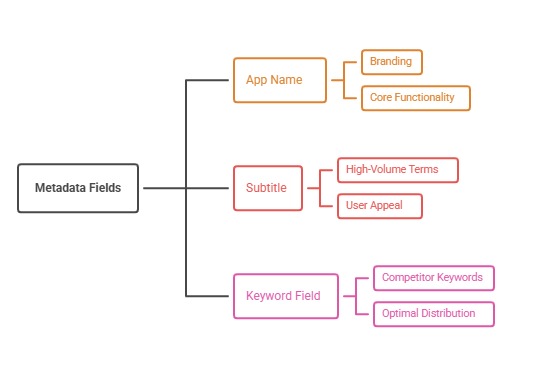
- Prompt 9 - Generate title and subtitle variations: "Our app is [describe app in two sentences]. Our top keyword priorities are [list keywords]. Generate five title and subtitle combinations under the App Store's character limits that naturally include our priority keywords without sounding repetitive or forced."
- Prompt 10 - Rewrite for clarity and conversion: "Here is our current app description [paste description]. Rewrite it to lead with our strongest value proposition in the first two lines, keep the tone direct and benefit-led, and avoid generic phrases like 'best app for.'"
Every metadata draft generated this way still needs a human pass for accuracy, brand voice, and compliance with store guidelines before it goes live. This is a good moment to reference Apple's own product page guidelines to make sure any AI-drafted metadata still fits the platform's formatting and content rules.
The Validation Step Most People Skip
The single biggest mistake we see with AI-assisted ASO work is treating the first output as the final answer. Language models are optimized to sound fluent and confident, not to be factually correct about your specific app, market, or competitors. That means every AI-generated recommendation needs a validation pass before it becomes part of a live strategy.
A practical validation checklist looks like this:
- Cross-check any keyword volume or competitor ranking claims against real ASO tool data, since the model cannot access live rank data on its own
- Review AI-drafted metadata against actual store character limits and current guidelines
- Confirm any factual claims about your app's features are accurate, not just plausible-sounding
- Check tone and brand voice against your existing style, since default AI output tends toward generic marketing language
- Have a second person review anything before it is published to a live listing
This validation discipline is exactly what we build into our own process at ASOWin, and it is the same principle behind our AI-powered ASO service, where automation and AI speed up the analysis, but every recommendation still gets human review before it reaches a client's live listing.
It is worth being honest that this validation step takes real time, and skipping it is exactly how AI-assisted workflows go wrong. A metadata draft that looks polished can still contain a subtly inaccurate feature claim, a keyword that no longer fits current character limits, or a phrase that reads oddly once translated back into how an actual user speaks. Building the review step into the process from day one, rather than treating it as optional, is what separates teams that use AI well from teams that get burned by it.
Where These Prompts Fit Into a Bigger ASO Ecosystem
Prompt-based workflows are one piece of a much bigger shift happening around conversational AI and app discovery. Our piece on the ChatGPT app ecosystem looks at how conversational AI interfaces are starting to influence how users discover and evaluate apps in the first place, which is a useful broader context for why AI fluency matters for ASO teams beyond just prompt-writing efficiency. We also cover the underlying shift toward semantic, intent-based search in our guide to semantic intent and ASO in 2026, which explains why grounded, natural language now matters more than mechanical keyword insertion.
Building a Prompt Library for Your Team
Individual prompts are useful, but the real efficiency gain comes from building a small internal library of proven prompt templates your whole ASO team can reuse and adapt. A simple starting structure works well:
- One template each for keyword clustering, review analysis, competitor comparison, and metadata drafting
- Placeholders for app-specific context, such as category, audience, and current keyword priorities
- A short validation checklist attached to each template, so nobody skips the review step
- A shared doc or internal tool where the team can log which prompts worked well and refine them over time
This turns AI-assisted ASO from a one-off trick into a repeatable part of the team's actual workflow, which is where the real time savings compound over weeks and months rather than a single lucky prompt.
Final Answer: Use AI to Speed Up Research, Not Replace Judgment
ChatGPT prompts can meaningfully speed up keyword clustering, review analysis, competitor research, and metadata drafting for ASO teams, but only when fed real, specific data and followed by a genuine validation step. Treat every AI output as a strong first draft, not a finished deliverable, and the time savings are real without sacrificing quality.
At ASOWin, we build exactly this kind of AI-assisted, human-validated workflow into how we support client apps, combining faster research and drafting with the strategic judgment that keeps recommendations accurate and on-brand. Explore more practical guides on the ASOWin blog, or get in touch if you want help building an AI-assisted ASO workflow for your team.